JeuTDFProno
Membres Forum
-
Inscription
-
Dernière visite
Tout ce qui a été posté par JeuTDFProno
-
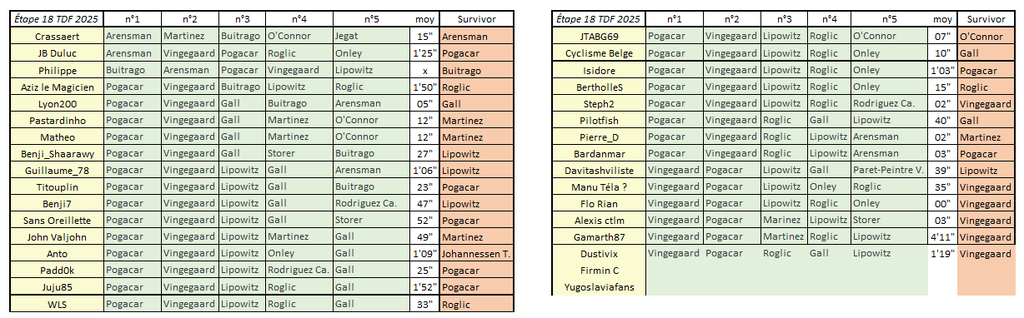
Récapitulatif Étape 18 TDF Prono & Survivor Tour 2025 Bonne étape à tous, que le meilleur gagne !
-
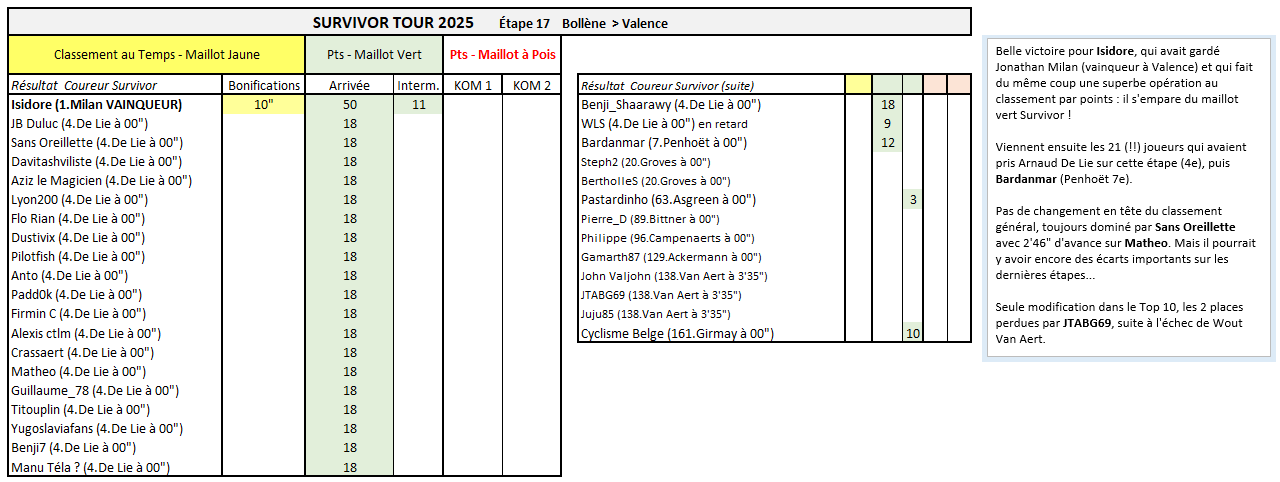
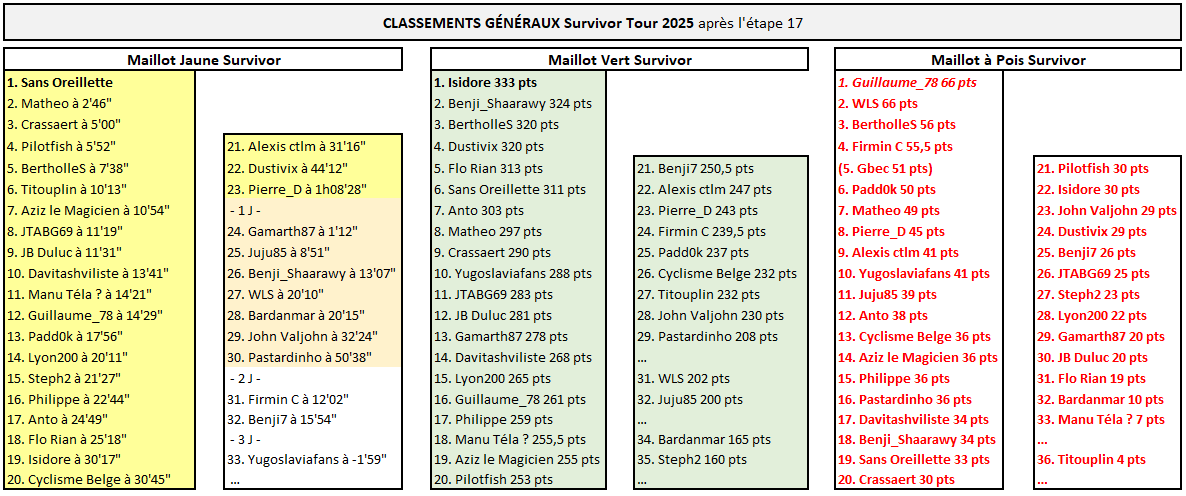
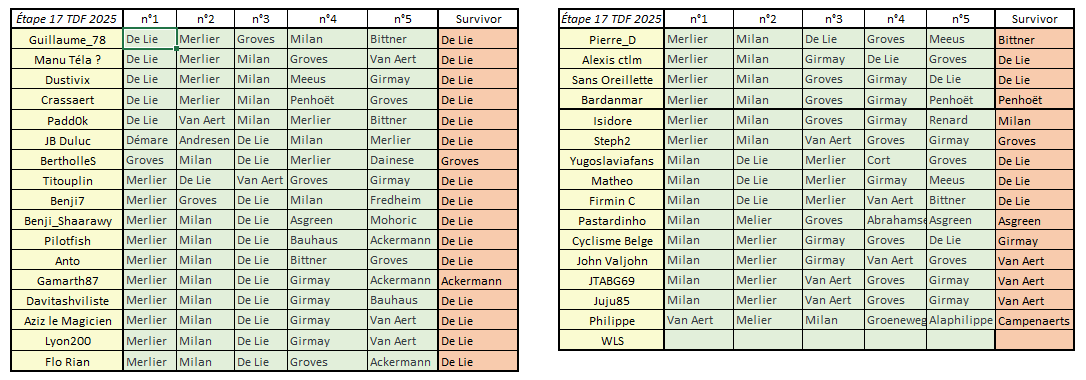
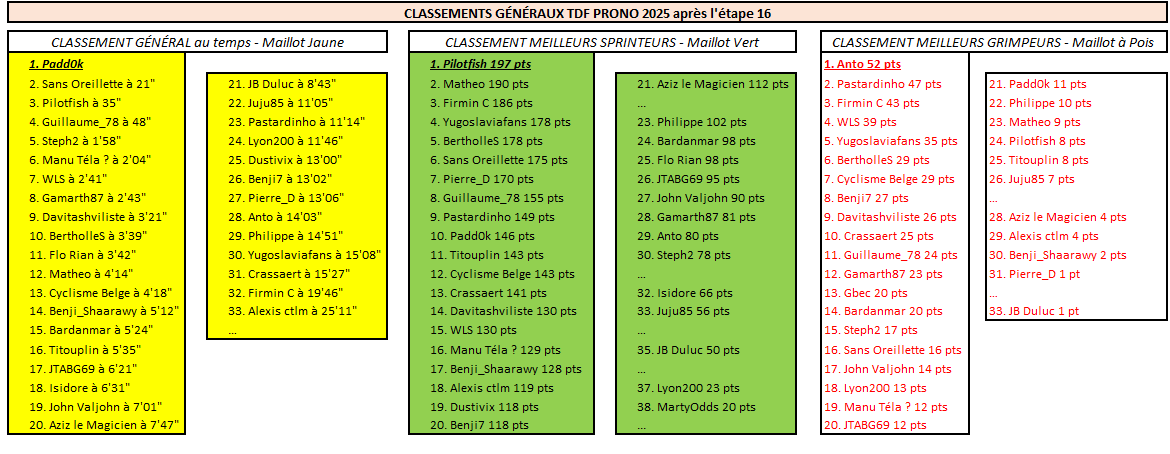
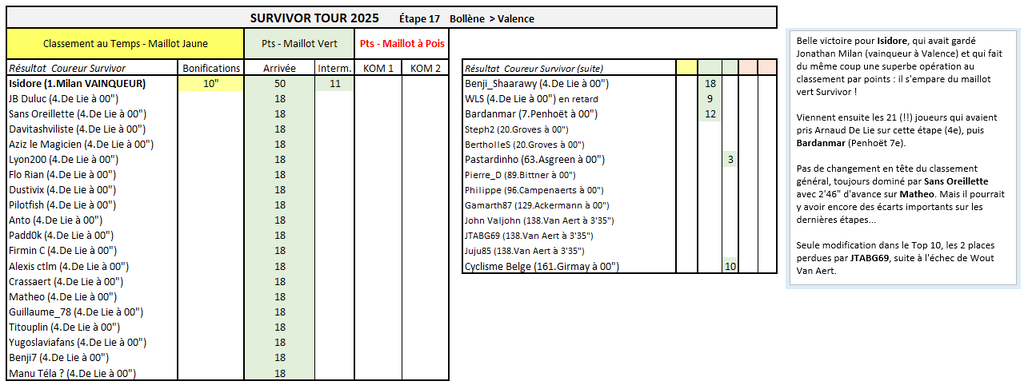
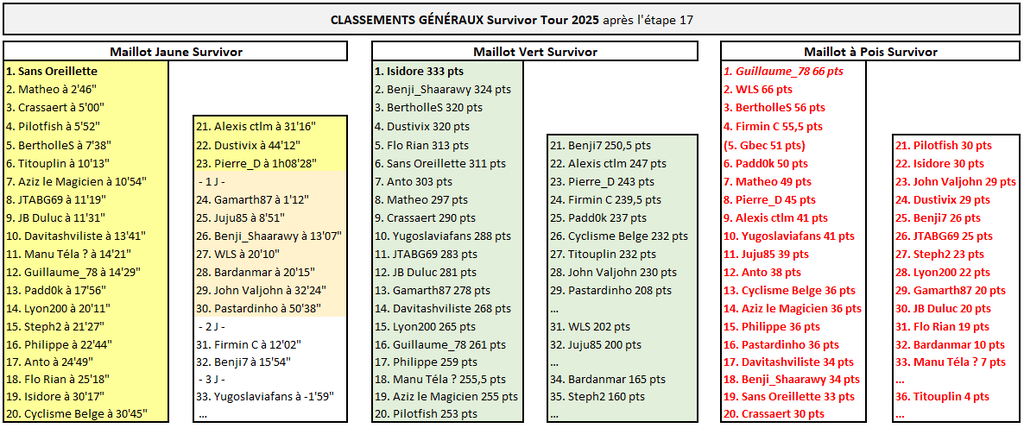
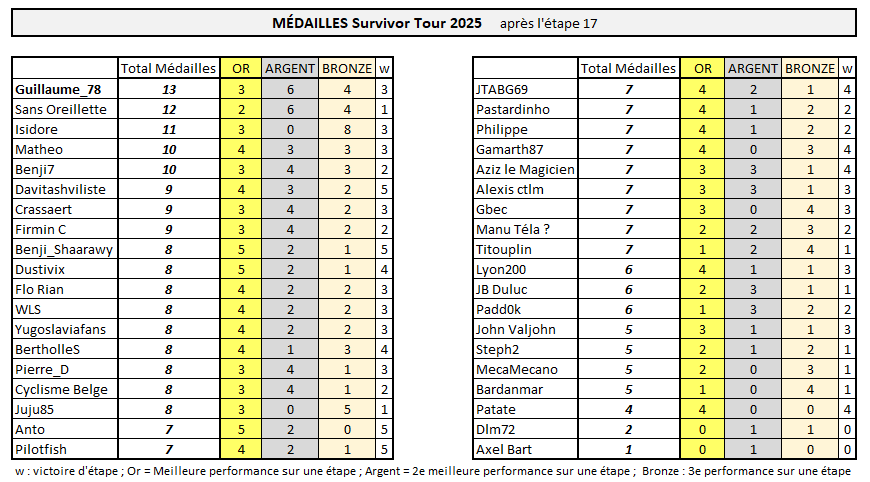
SURVIVOR TOUR Belle victoire pour Isidore, qui avait gardé Jonathan Milan (vainqueur à Valence) et qui fait du même coup une superbe opération au classement par points : il s'empare du maillot vert Survivor ! Viennent ensuite les 21 (!!) joueurs qui avaient pris Arnaud De Lie sur cette étape (4e), puis Bardanmar (Penhoët 7e). Pas de changement en tête du classement général, toujours dominé par Sans Oreillette avec 2'46" d'avance sur Matheo. Mais il pourrait y avoir encore des écarts importants sur les dernières étapes... Seule modification dans le Top 10, les 2 places perdues par JTABG69, suite à l'échec de Wout Van Aert.
-
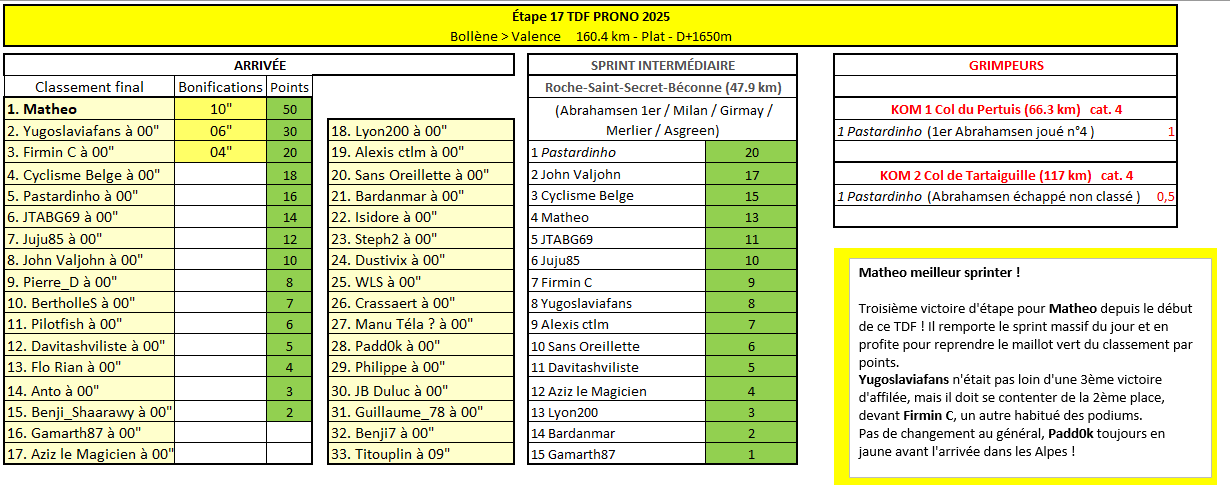
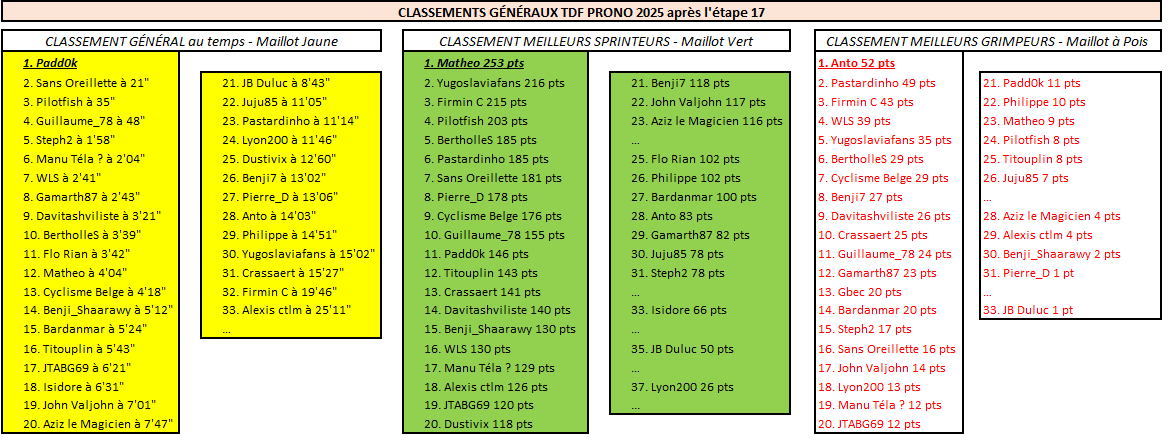
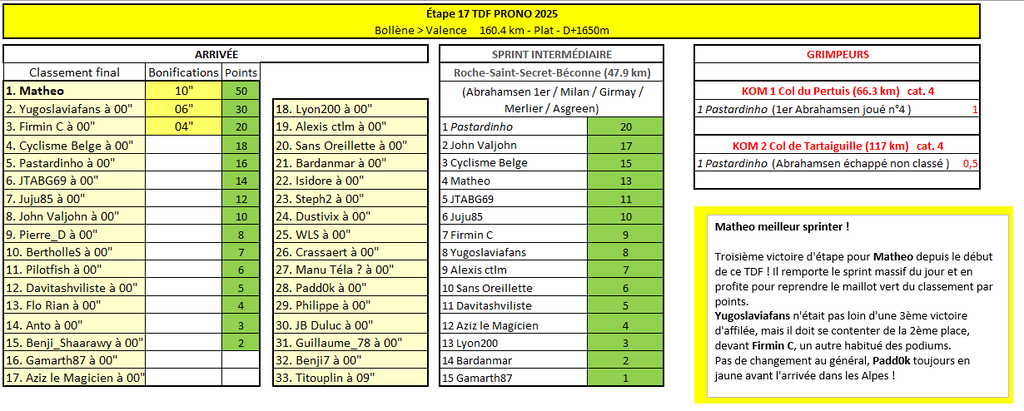
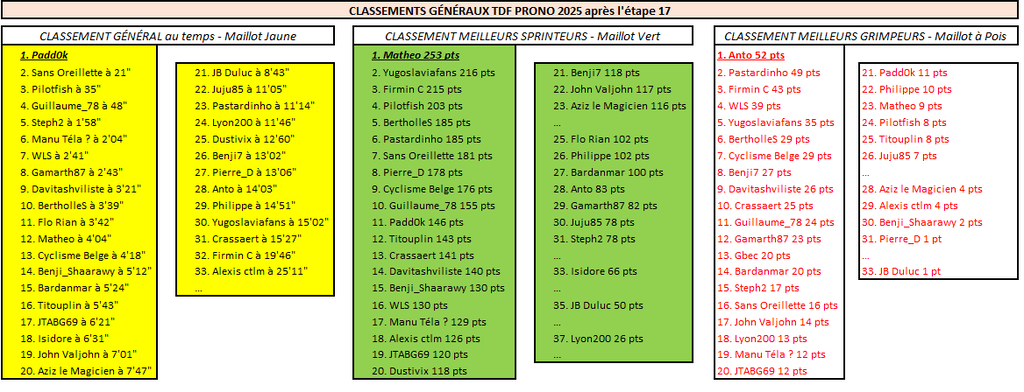
TDF PRONO Matheo meilleur sprinter ! Troisième victoire d'étape pour Matheo depuis le début de ce TDF ! Il remporte le sprint massif du jour et en profite pour reprendre le maillot vert du classement par points. Yugoslaviafans n'était pas loin d'une 3ème victoire d'affilée, mais il doit se contenter de la 2ème place, devant Firmin C, un autre habitué des podiums. Pas de changement au général, Padd0k toujours en jaune avant l'arrivée dans les Alpes !
-
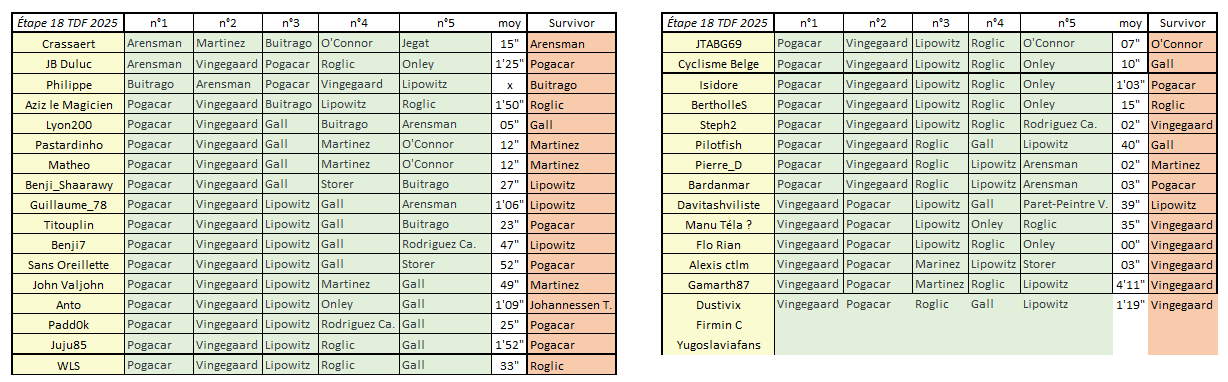
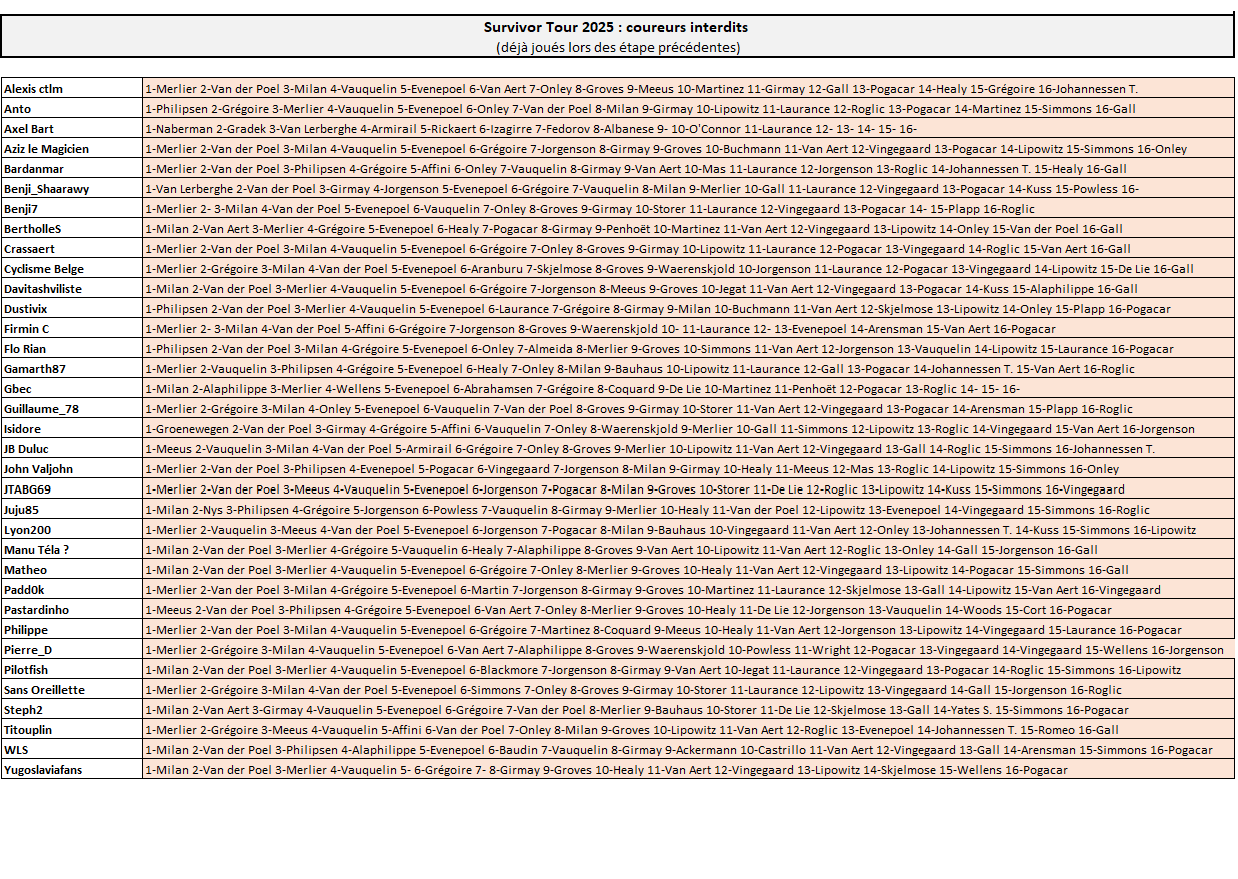
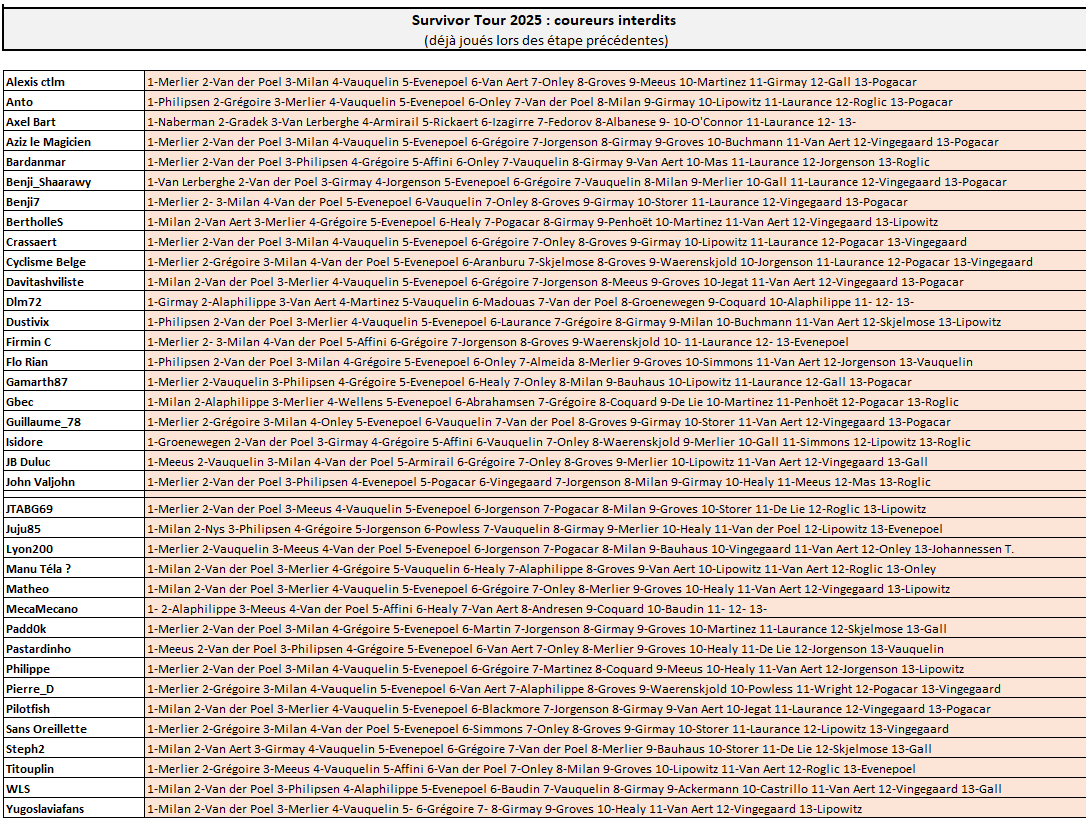
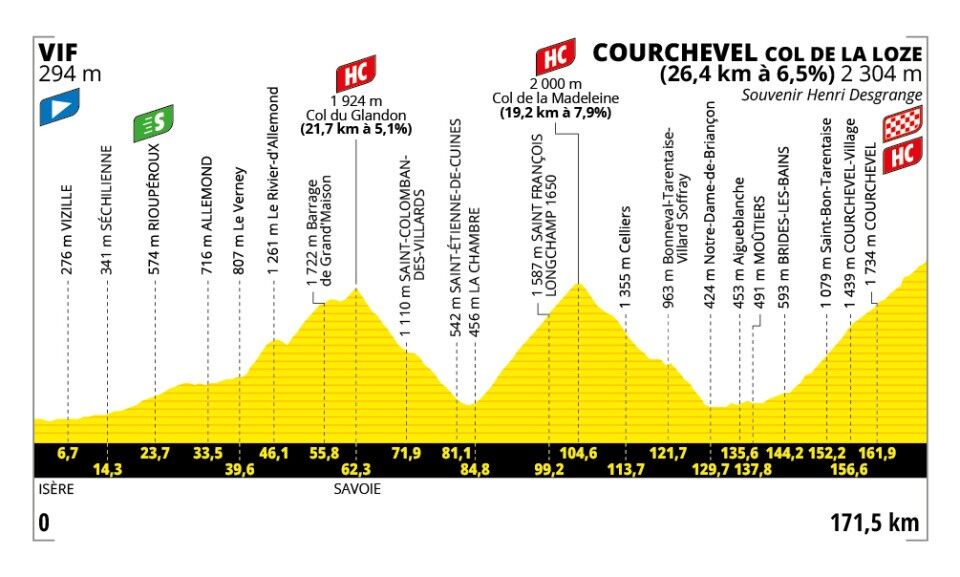
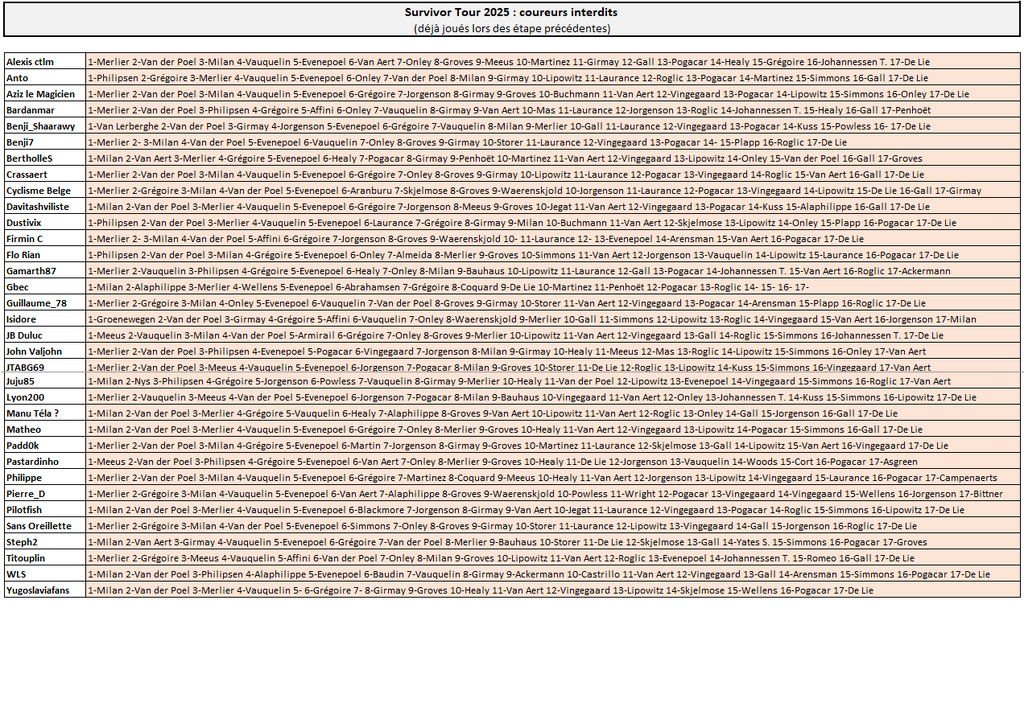
TDF Prono & Survivor Tour 2025 - Étape 18 : Vif > Courchevel Col de la Loze 171.5 km - Montagne - D+5450m - Arrivée au sommet Départ fictif : jeudi 24 juillet à 12h10 --- Coureur n°1 : Coureur n°2 : Coureur n°3 : Coureur n°4 : Coureur n°5 : écart entre 1er et 2e : --- Survivor Étape 18 : ----------- Le pronostic sur l'écart entre 1er et 2e ne servira qu'à départager les éventuels pronos identiques ----------- Top coureurs avant cette étape : Le Top 10 du classement général : Pogačar, Vingegaard, Lipowitz, Onley, Vauquelin, Roglic, Gall, Johannessen T., Rodriguez Ca., Healy. ----------- -------------------------------------------------------------------- Vos coureurs interdits au jeu Survivor (coureurs déjà joués sur les étapes précédentes)
-
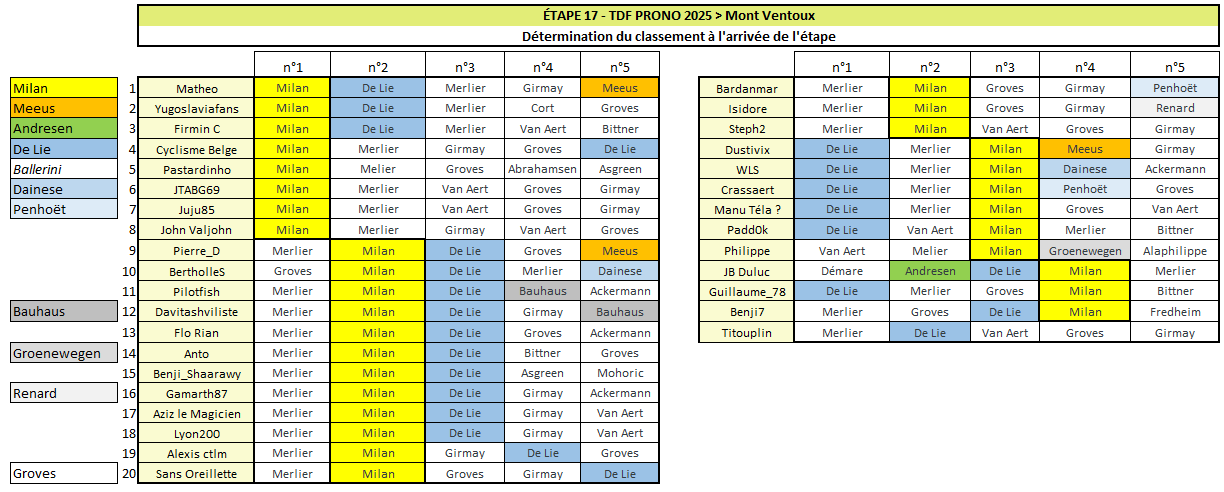
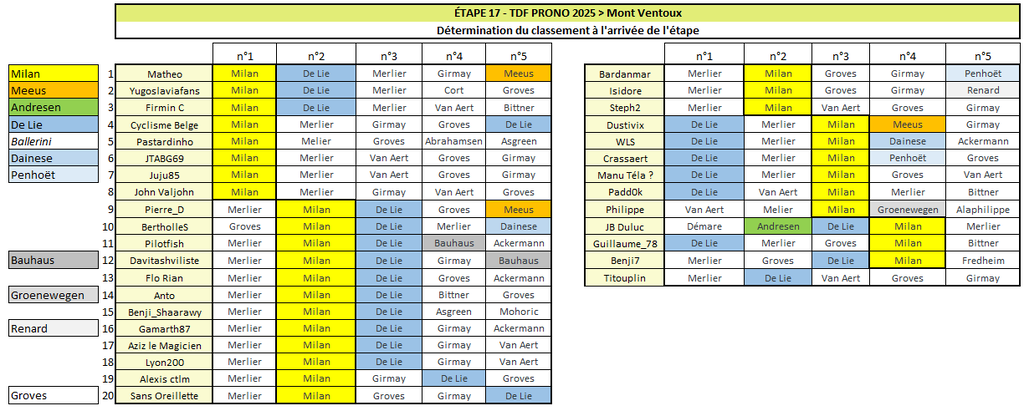
Matheo remporte le sprint (1er Milan joué n°1 + 2e Meeus n°5) et reprend le maillot vert ! 2e Yugoslaviafans (pas loin de la passe de trois) 3e Firmin C (Milan n°1 + De Lie n°2) le Top 10 : 1 Matheo 2 Yugoslaviafans 3 Firmin C 4 Cyclisme Belge 5 Pastardinho 6 JTABG69 7 Juju85 8 John Valjohn 9 Pierre_D 10 BertholleS Peloton groupé, aucun changement au général
-
Récapitulatif Étape 17 TDF Prono & Survivor Tour 2025 Bonne course à tous, que le meilleur gagne !
-
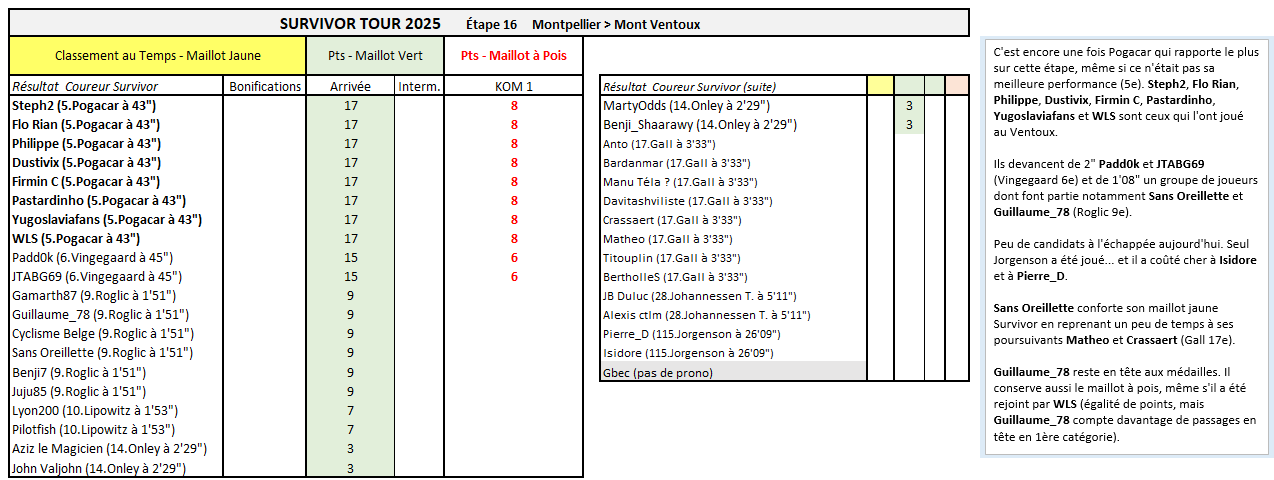
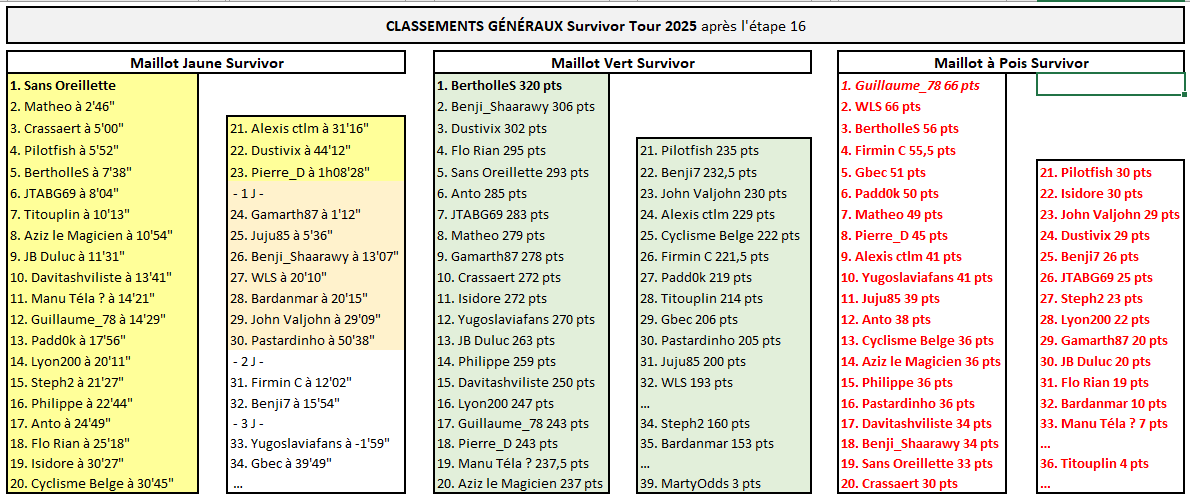
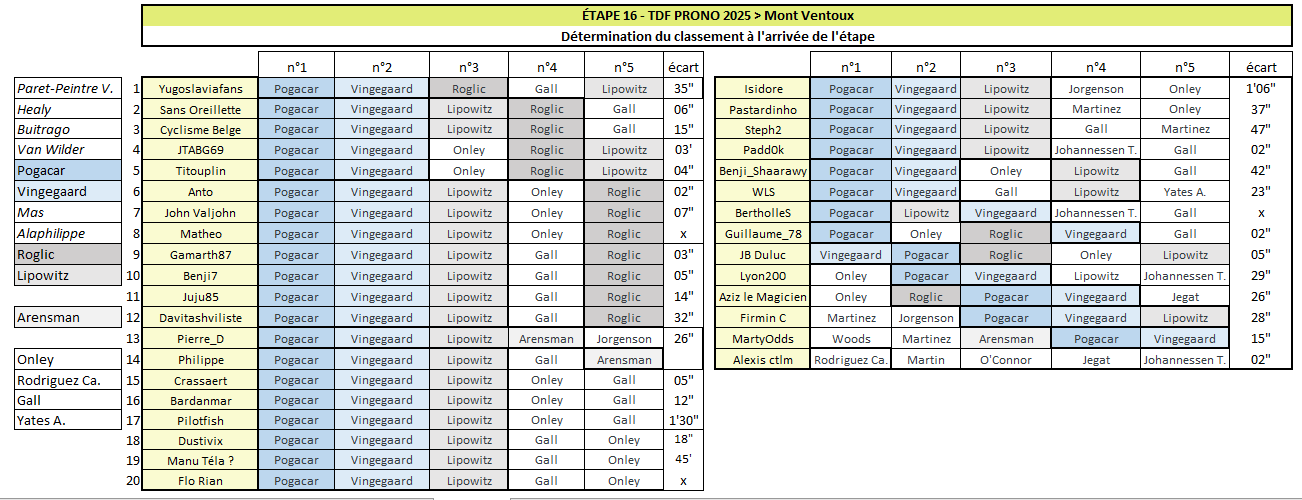
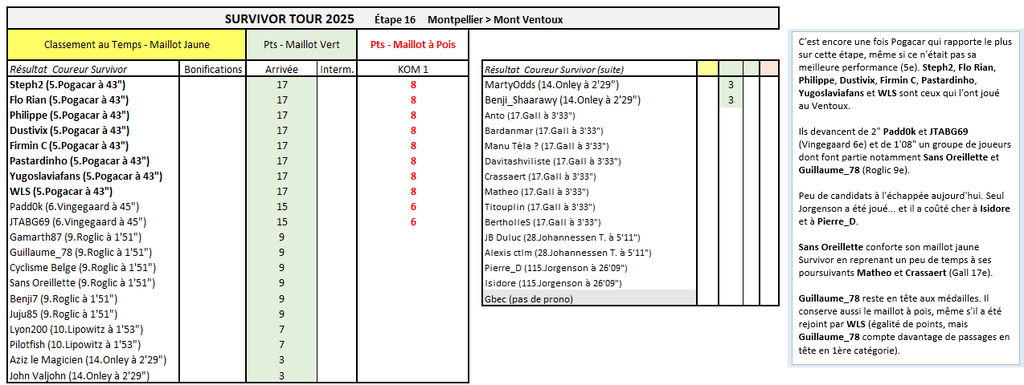
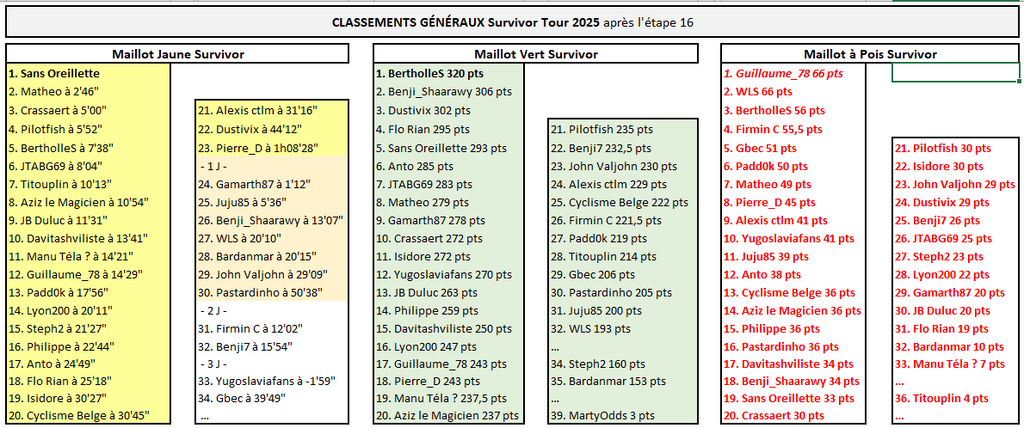
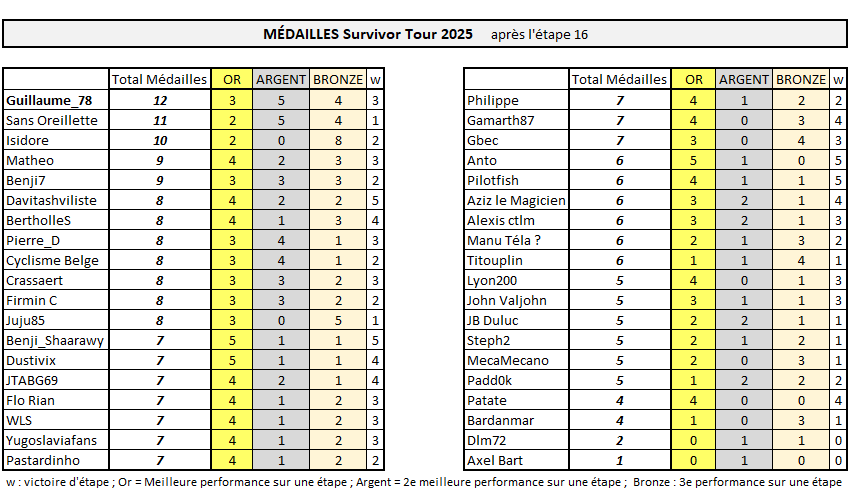
SURVIVOR TOUR C'est encore une fois Pogacar qui rapporte le plus sur cette étape, même si ce n'était pas sa meilleure performance (5e). Steph2, Flo Rian, Philippe, Dustivix, Firmin C, Pastardinho, Yugoslaviafans et WLS sont ceux qui l'ont joué au Ventoux. Ils devancent de 2" Padd0k et JTABG69 (Vingegaard 6e) et de 1'08" un groupe de joueurs dont font partie notamment Sans Oreillette et Guillaume_78 (Roglic 9e). Peu de candidats à l'échappée aujourd'hui. Seul Jorgenson a été joué... et il a coûté cher à Isidore et à Pierre_D. Sans Oreillette conforte son maillot jaune Survivor en reprenant un peu de temps à ses poursuivants Matheo et Crassaert (Gall 17e). Guillaume_78 reste en tête aux médailles. Il conserve aussi le maillot à pois, même s'il a été rejoint par WLS (égalité de points, mais Guillaume_78 compte davantage de passages en tête en 1ère catégorie).
-
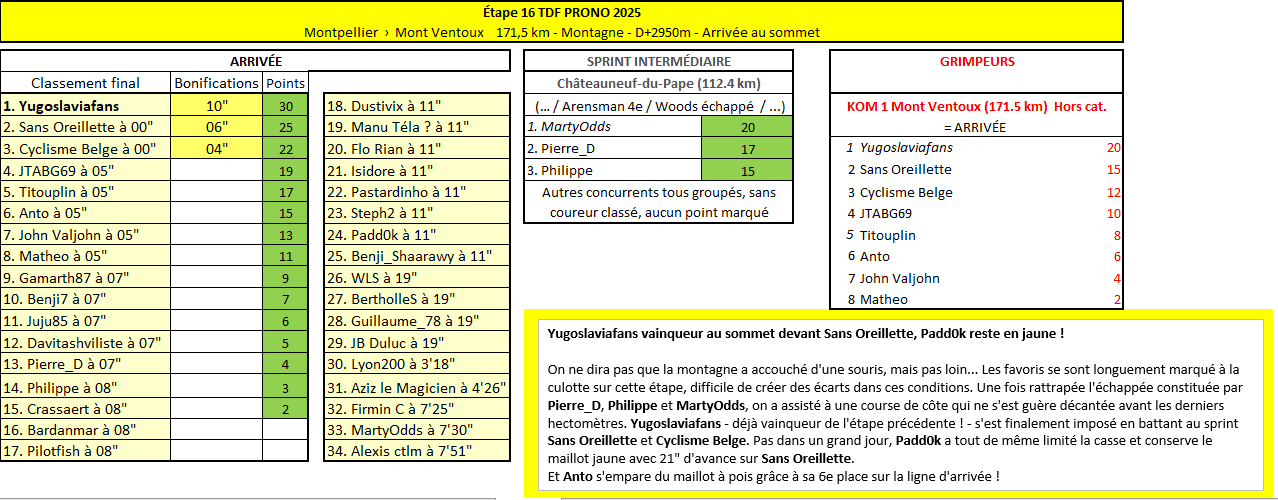
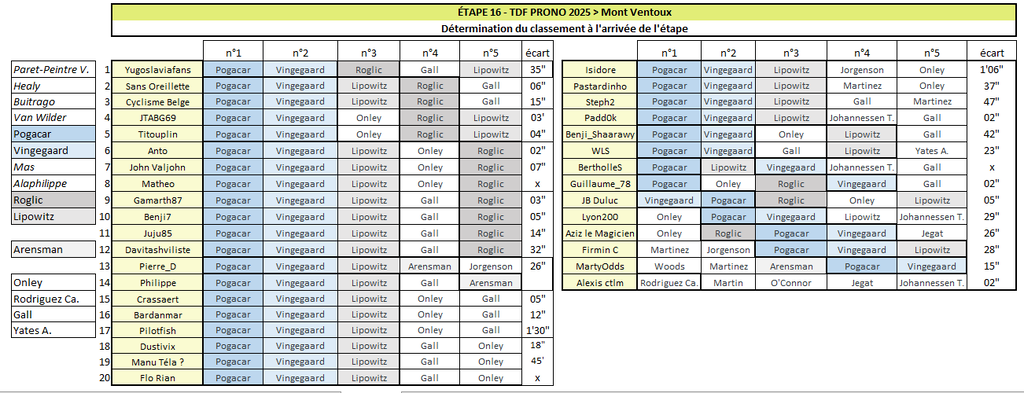
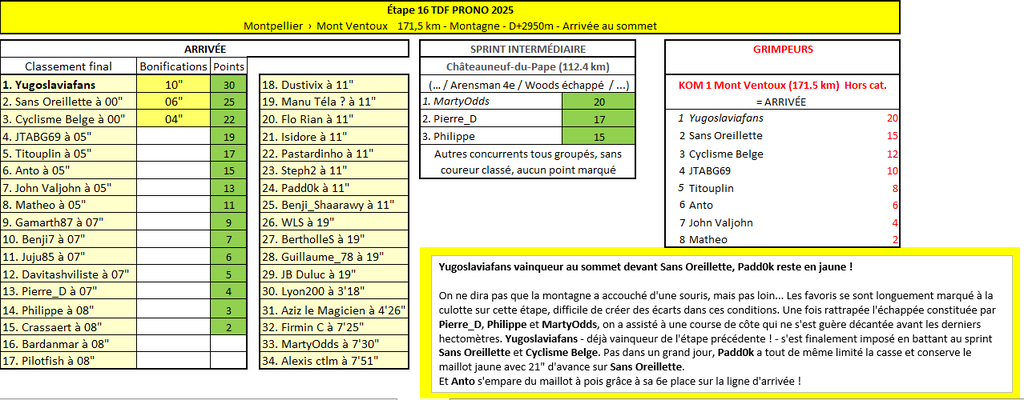
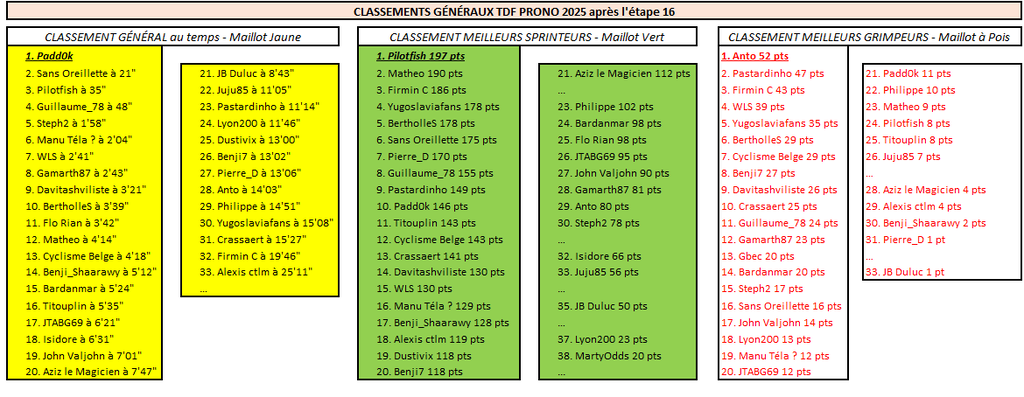
TDF PRONO Yugoslaviafans vainqueur au sommet devant Sans Oreillette, Padd0k reste en jaune ! On ne dira pas que la montagne a accouché d'une souris, mais pas loin... Les favoris se sont longuement marqué à la culotte sur cette étape, difficile de créer des écarts dans ces conditions. Une fois rattrapée l’échappée constituée par Pierre_D, Philippe et MartyOdds, on a assisté à une course de côte qui ne s'est guère décantée avant les derniers hectomètres. Yugoslaviafans - déjà vainqueur de l'étape précédente ! - s'est finalement imposé en battant au sprint Sans Oreillette et Cyclisme Belge. Pas dans un grand jour, Padd0k a tout de même limité la casse et conserve le maillot jaune avec 21" d'avance sur Sans Oreillette. Et Anto s'empare du maillot à pois grâce à sa 6e place sur la ligne d'arrivée !
-
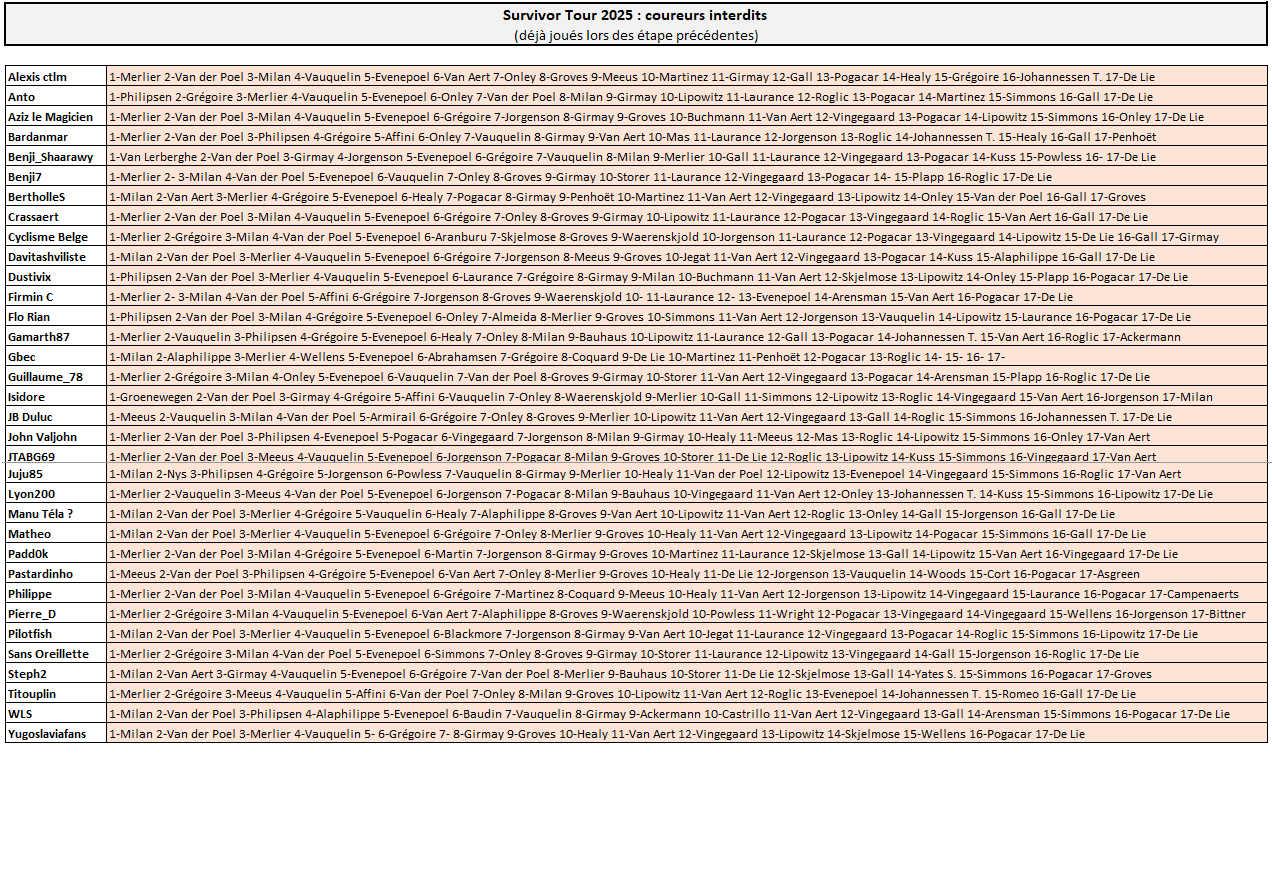
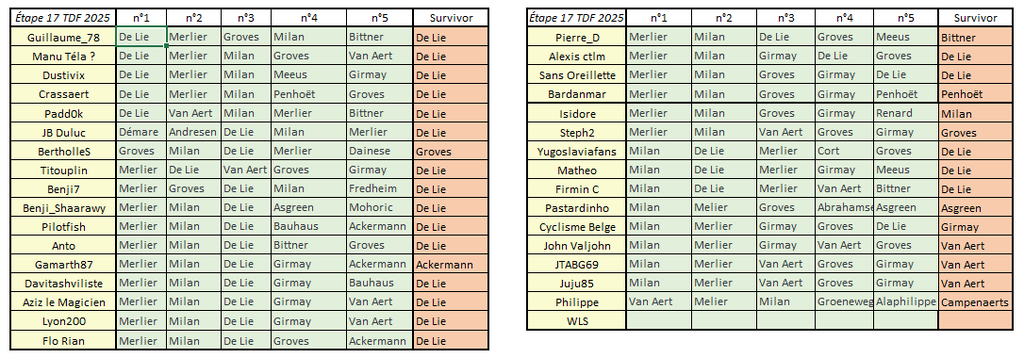
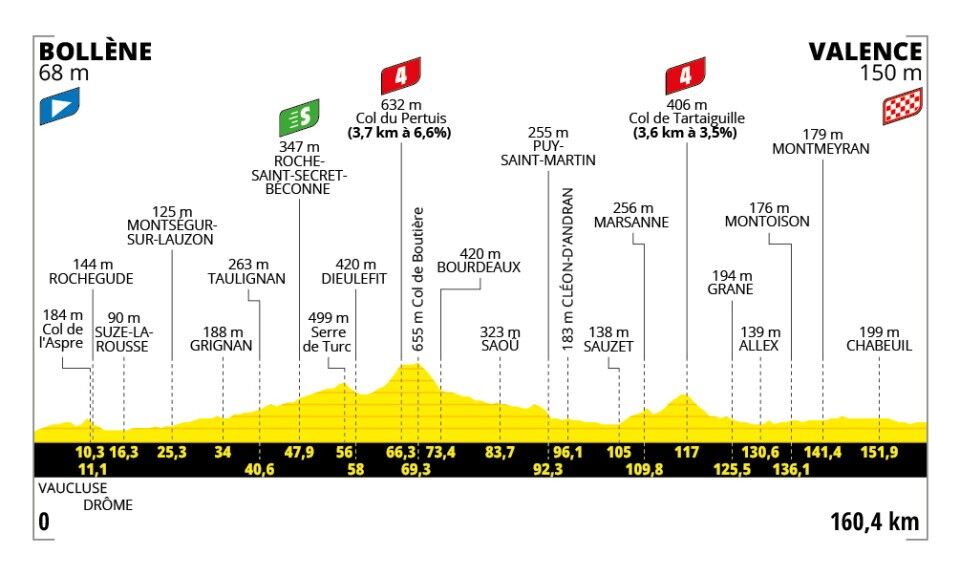
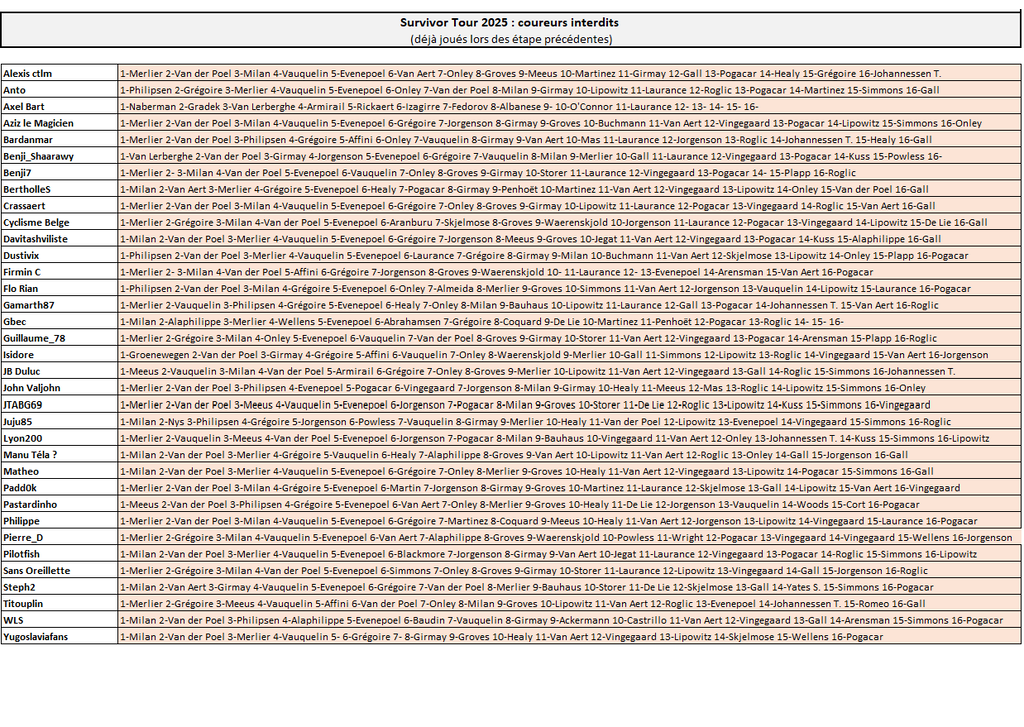
TDF Prono & Survivor Tour 2025 - Étape 17 : Bollène > Valence 160.4 km - Plat - D+1650m Départ : mercredi 23 juillet à 13h35 --- Coureur n°1 : Coureur n°2 : Coureur n°3 : Coureur n°4 : Coureur n°5 : --- Survivor Étape 17 : ----------- Top coureurs avant cette étape : Le Top 10 du classement général : Pogačar, Vingegaard, Lipowitz, Onley, Roglic, Vauquelin, Gall, Johannessen T., Healy, Rodriguez Ca. ----------- -------------------------------------------------------------------- Vos coureurs interdits au jeu Survivor (coureurs déjà joués sur les étapes précédentes)
-
Yugoslaviafans gagne de nouveau aujourd'hui ! (grâce à Roglic n°3 derrière Pogacar-Vingegaard) Il s'impose devant Cyclisme Belge, Sans Oreillette, Titouplin et JTABG69 (Roglic n°4)
-
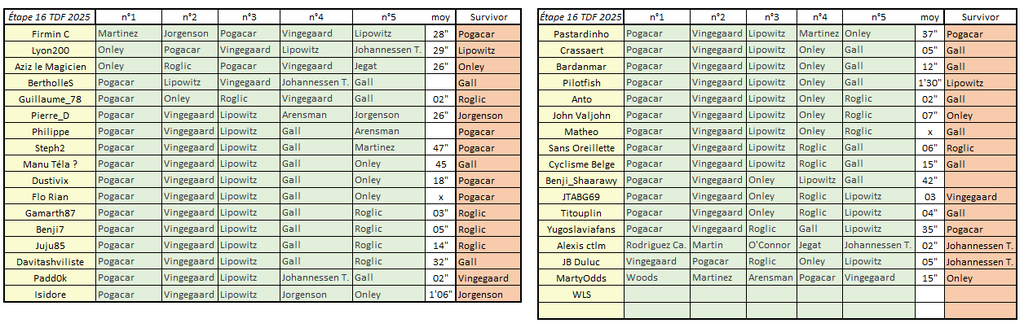
Récapitulatif Étape 16 TDF Prono & Survivor Tour 2025 Bonne course à tous, que le meilleur gagne !
-
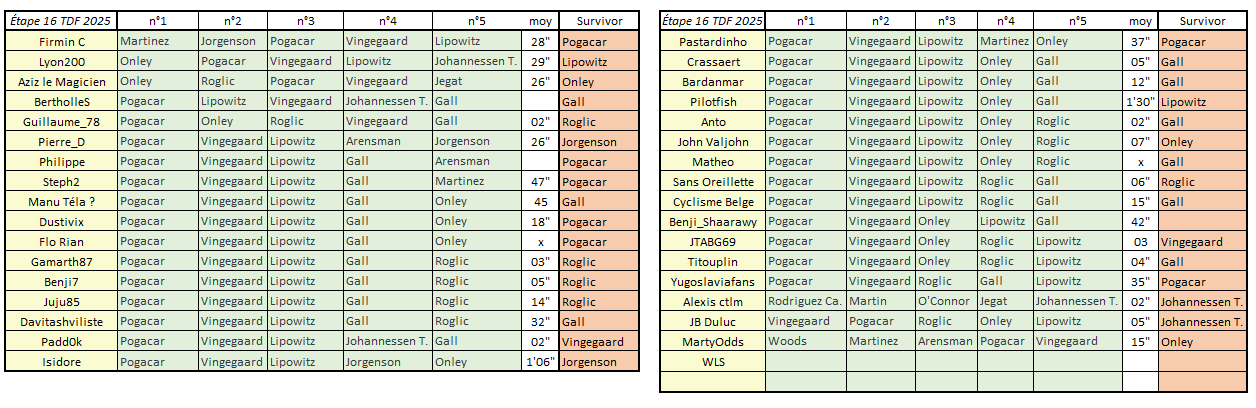
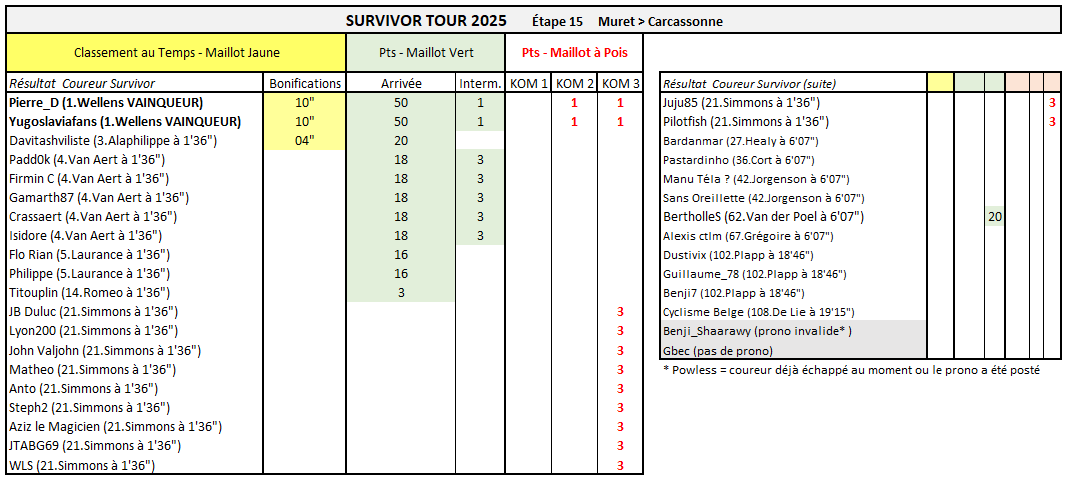
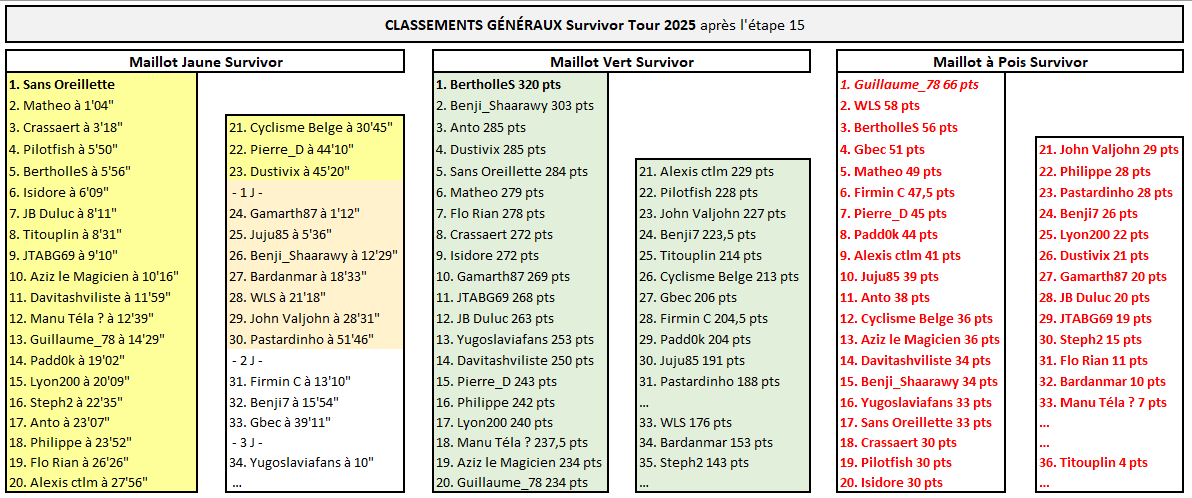
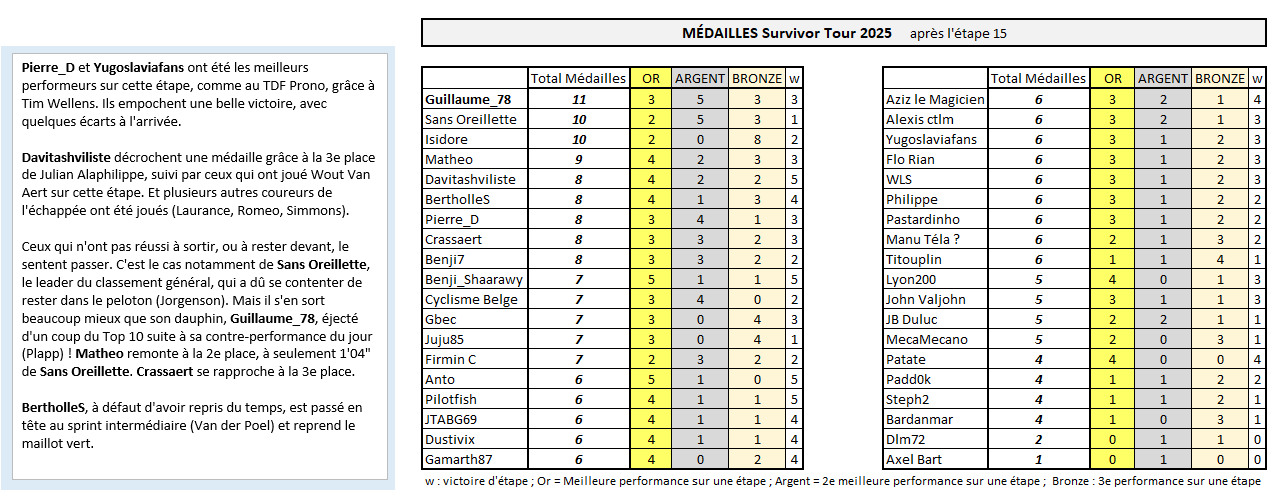
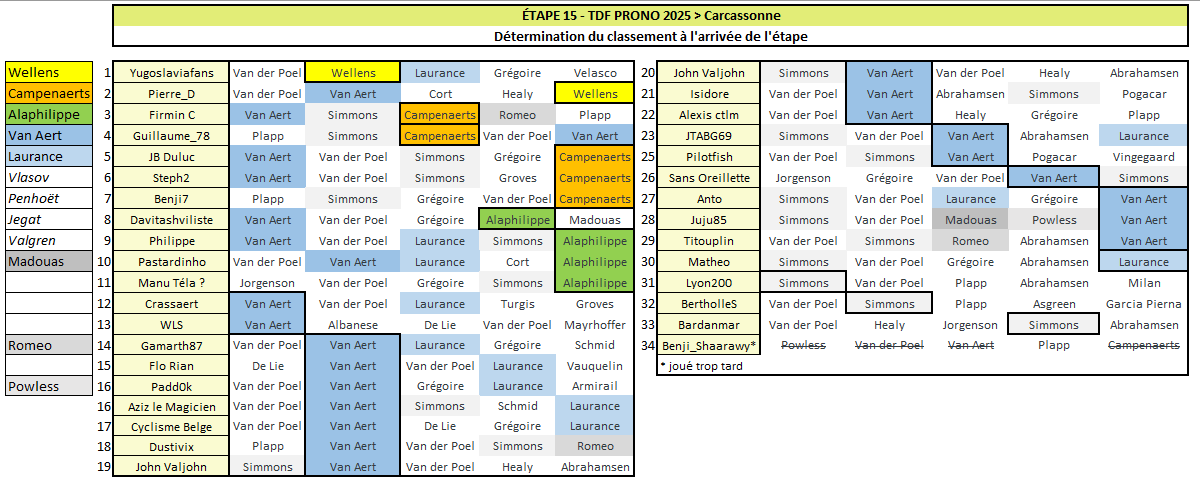
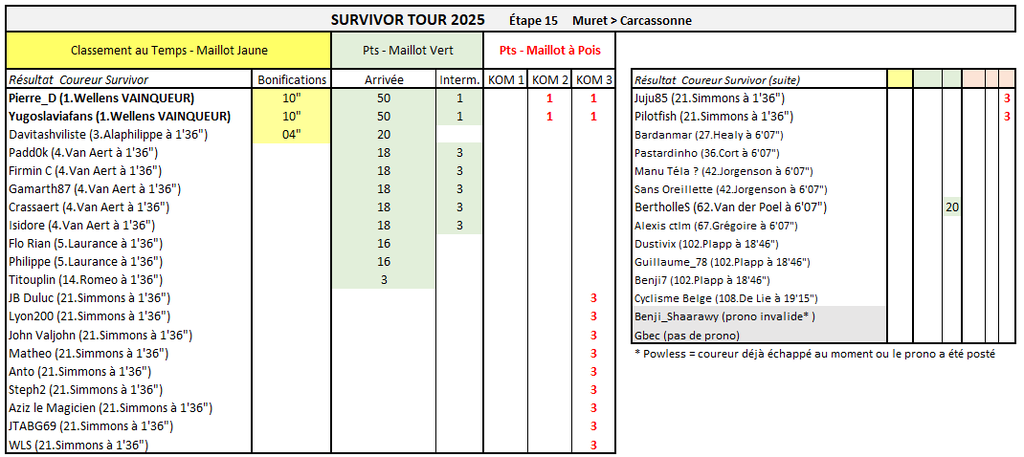
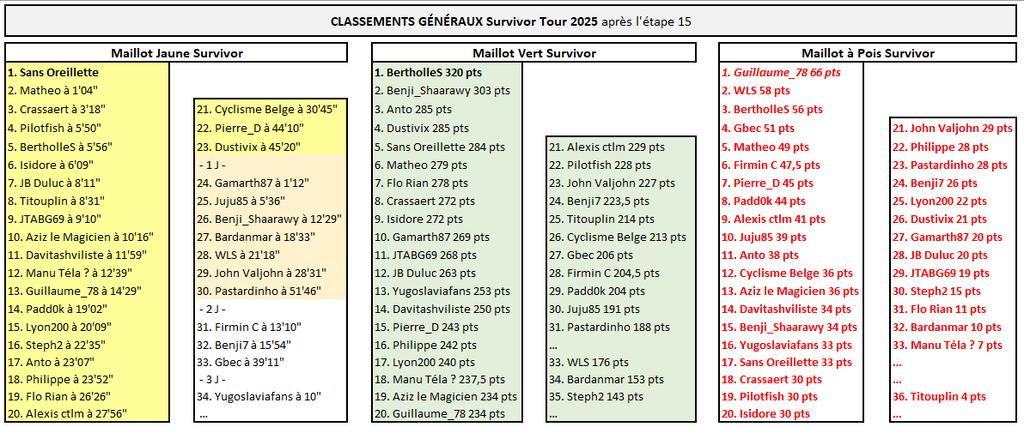
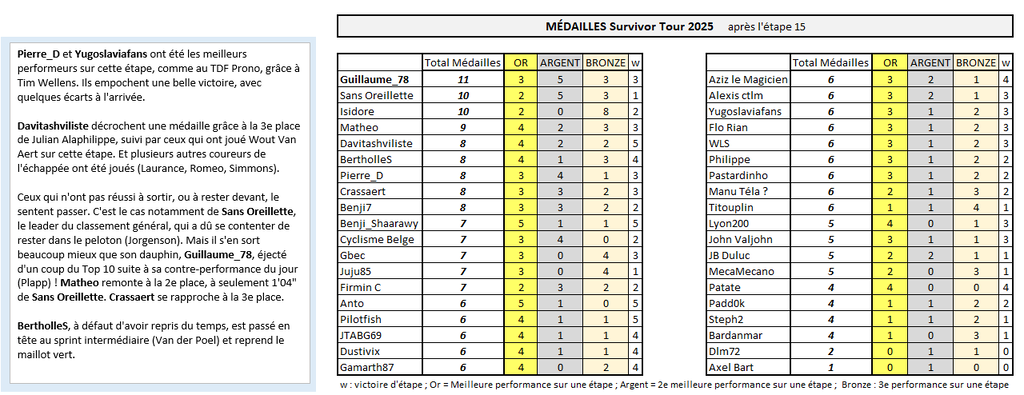
SURVIVOR TOUR Pierre_D et Yugoslaviafans ont été les meilleurs performeurs sur cette étape, comme au TDF Prono, grâce à Tim Wellens. Ils empochent une belle victoire, avec quelques écarts à l'arrivée. Davitashviliste décrochent une médaille grâce à la 3e place de Julian Alaphilippe, suivi par ceux qui ont joué Wout Van Aert sur cette étape. Et plusieurs autres coureurs de l'échappée ont été joués (Laurance, Romeo, Simmons). Ceux qui n'ont pas réussi à sortir, ou à rester devant, le sentent passer. C'est le cas notamment de Sans Oreillette, le leader du classement général, qui a dû se contenter de rester dans le peloton (Jorgenson). Mais il s'en sort beaucoup mieux que son dauphin, Guillaume_78, éjecté d'un coup du Top 10 suite à sa contre-performance du jour (Plapp) ! Matheo remonte à la 2e place, à seulement 1'04" de Sans Oreillette. Crassaert se rapproche à la 3e place. BertholleS, à défaut d'avoir repris du temps, est passé en tête au sprint intermédiaire (Van der Poel) et reprend le maillot vert.
-
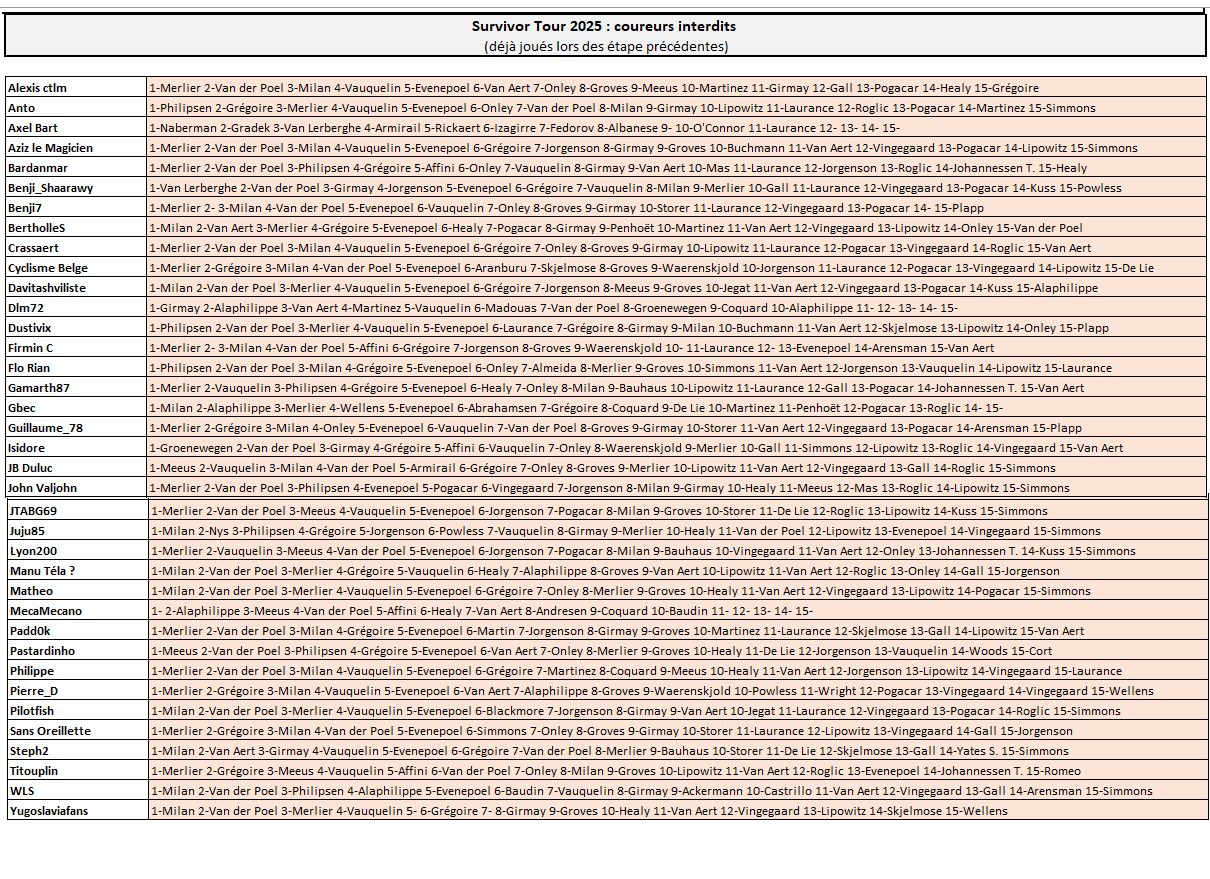
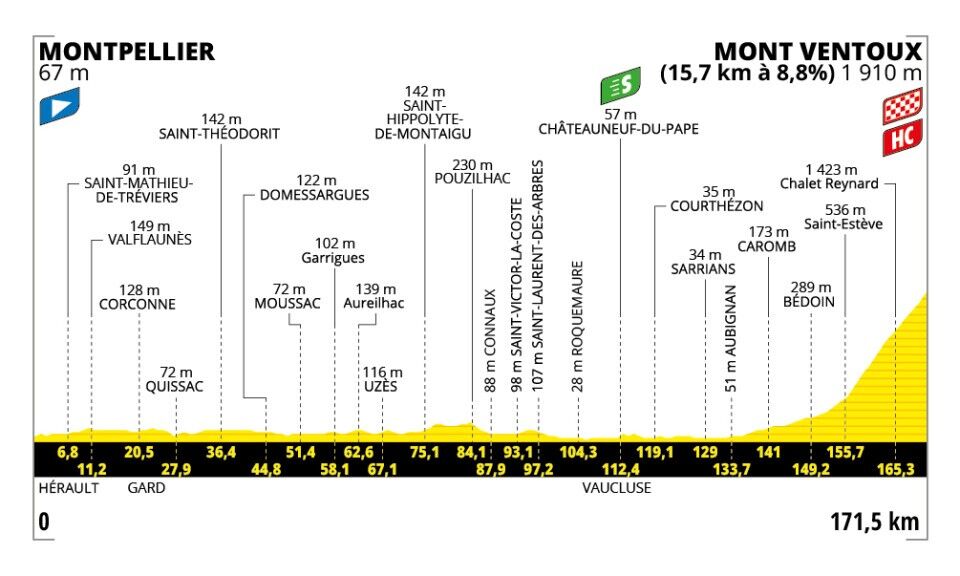
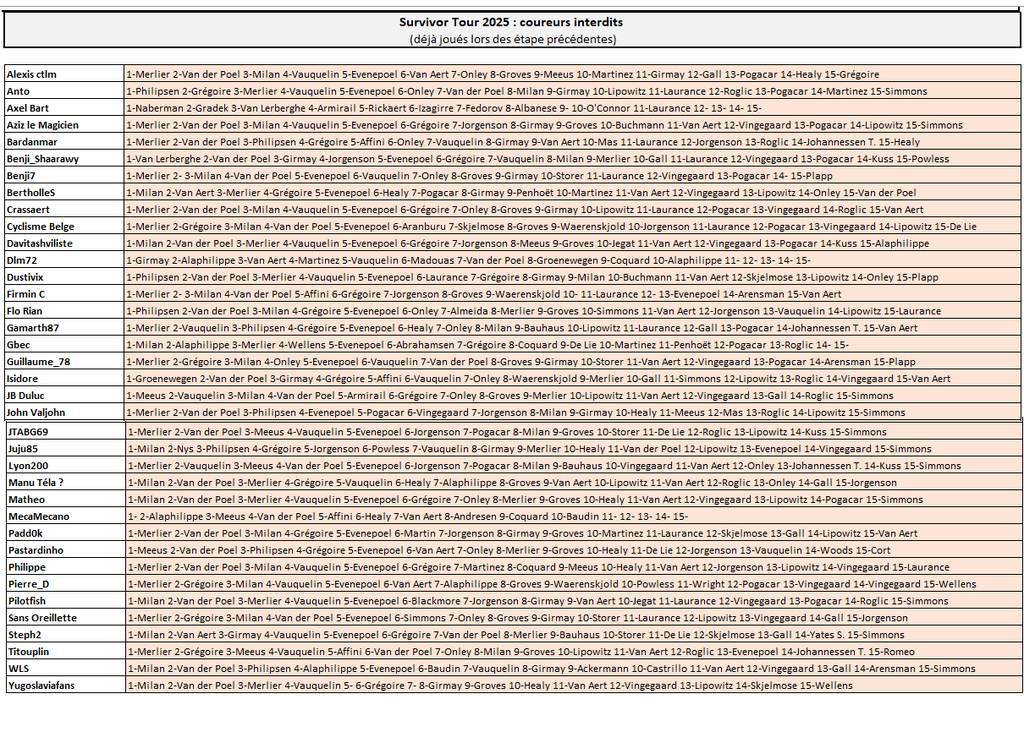
TDF Prono & Survivor Tour 2025 - Étape 16 : Montpellier > Mont Ventoux 171.5 km - Montagne - D+2950m - Arrivée au sommet Départ fictif : mardi 22 juillet à 12h10 --- Coureur n°1 : Coureur n°2 : Coureur n°3 : Coureur n°4 : Coureur n°5 : écart entre 1er et 2e : --- Survivor Étape 16 : ----------- Le pronostic sur l'écart entre 1er et 2e ne servira qu'à départager les éventuels pronos identiques ----------- Top coureurs avant cette étape : Le Top 10 du classement général : Pogačar, Vingegaard, Lipowitz, Onley, Vauquelin, Roglic, Gall, Johannessen T., Rodriguez Ca., Healy. ----------- -------------------------------------------------------------------- Vos coureurs interdits au jeu Survivor (coureurs déjà joués sur les étapes précédentes)
-
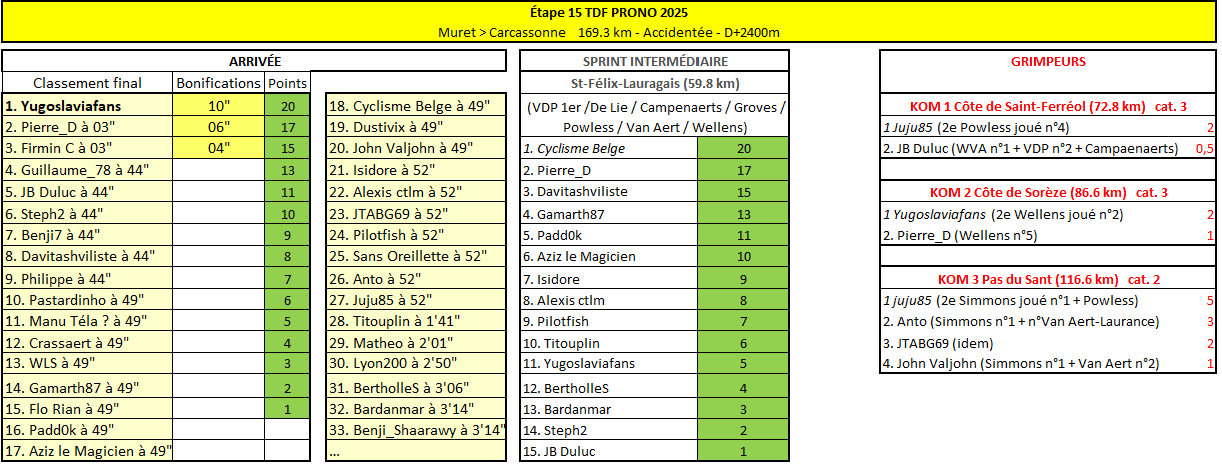
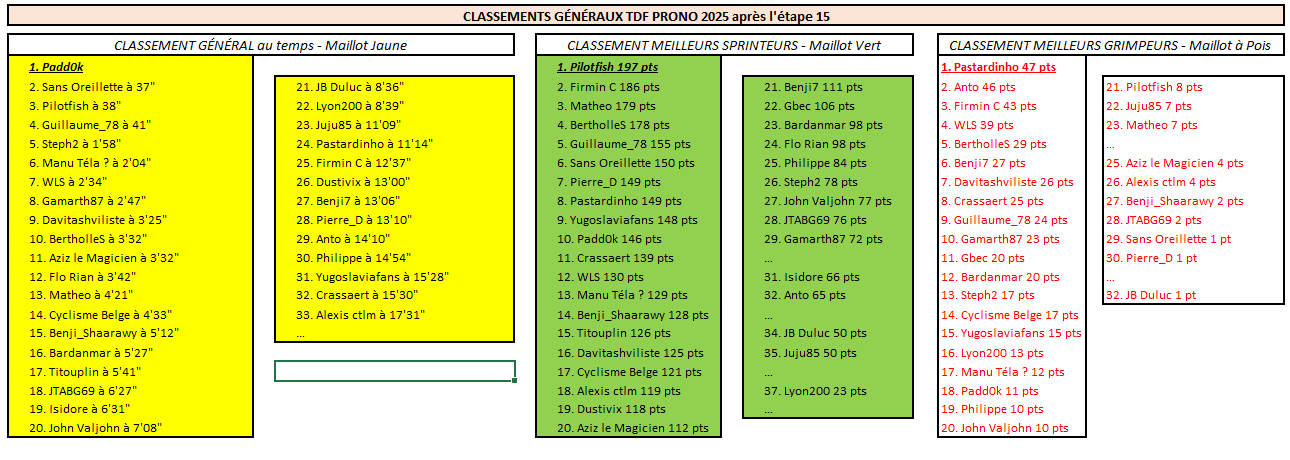
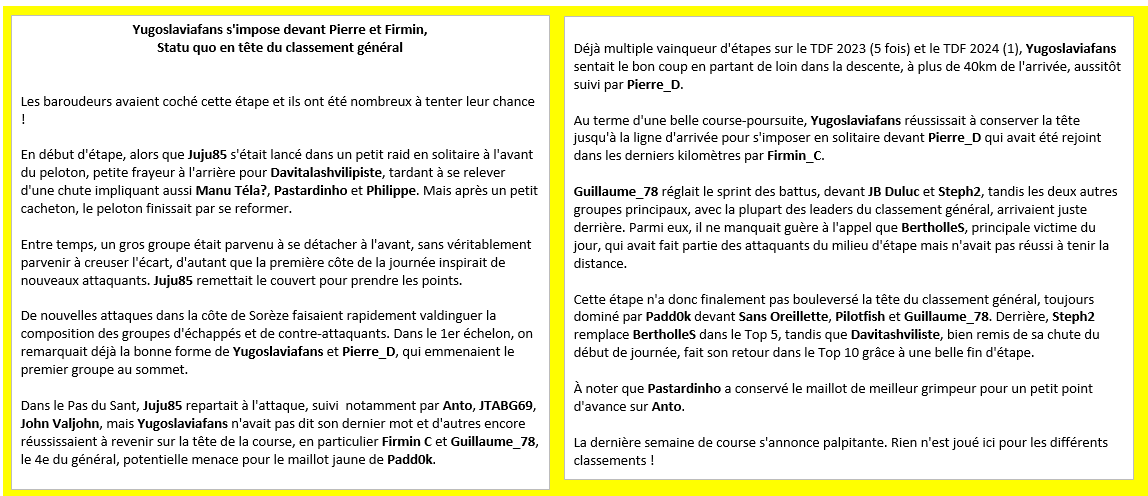
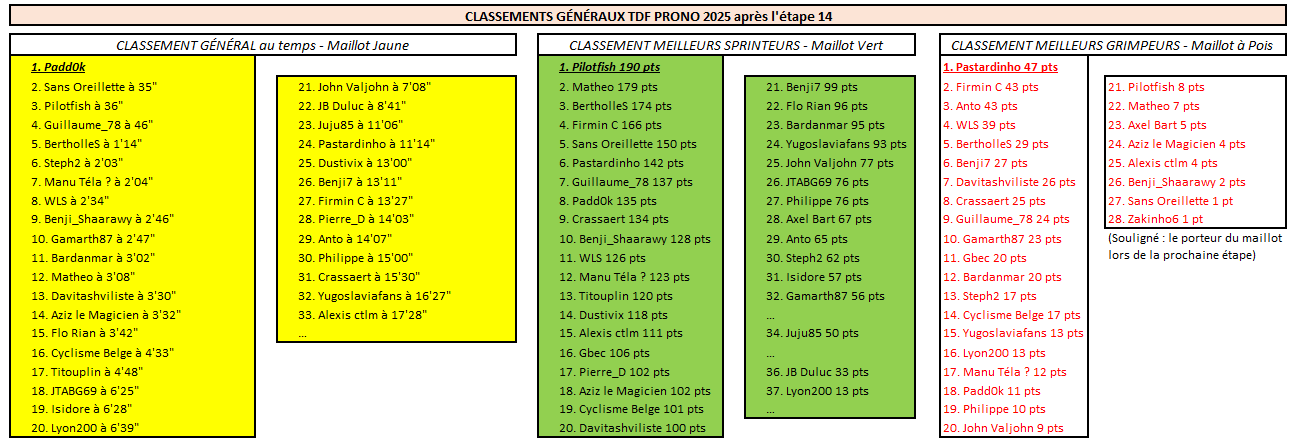
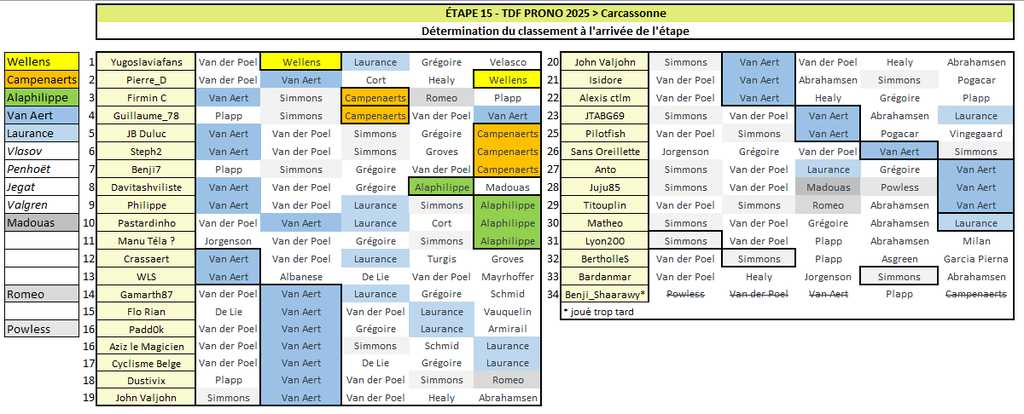
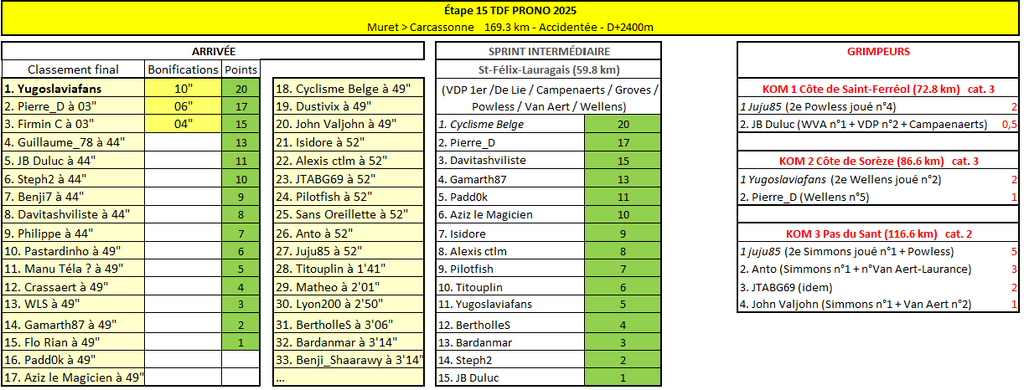
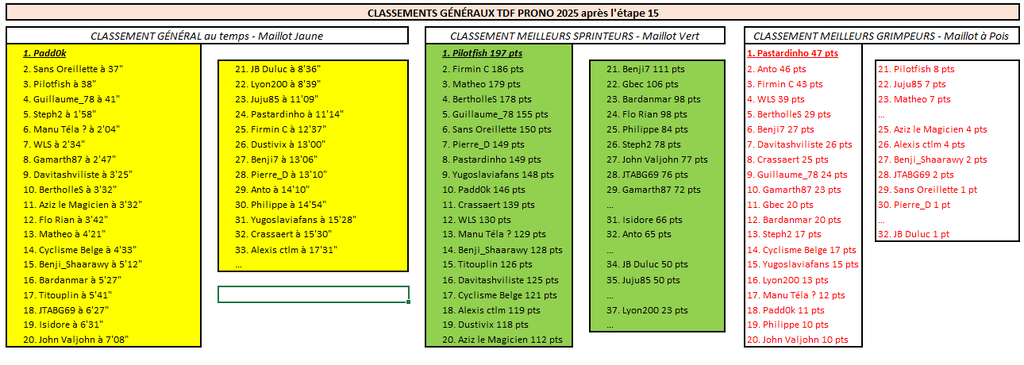
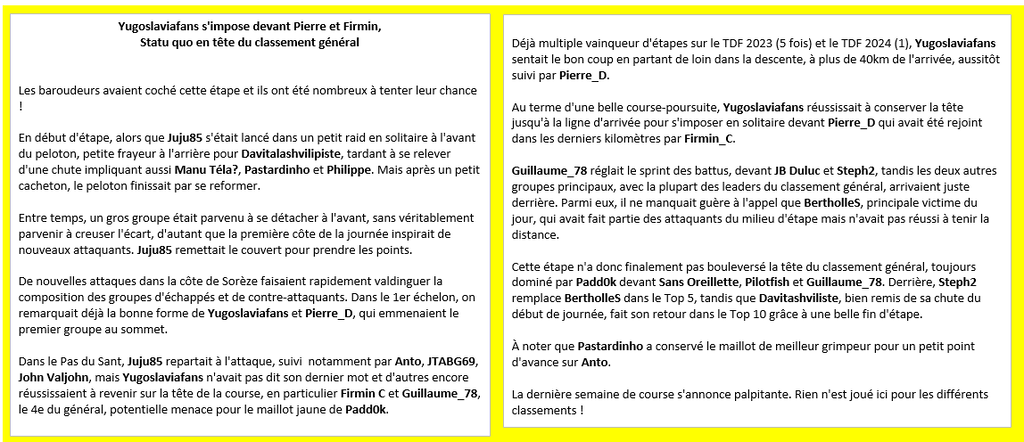
TDF PRONO Yugoslaviafans s'impose devant Pierre et Firmin, Statu quo en tête du classement général (ou presque) Les baroudeurs avaient coché cette étape et ils ont été nombreux à tenter leur chance ! En début d'étape, alors que Juju85 s'était lancé dans un petit raid en solitaire à l'avant du peloton, petite frayeur à l'arrière pour Davitalashvilipiste, tardant à se relever d'une chute impliquant aussi Manu Téla?, Pastardinho et Philippe. Mais après un petit cacheton, le peloton finissait par se reformer. Entre temps, un gros groupe était parvenu à se détacher à l'avant, sans véritablement parvenir à creuser l'écart, d'autant que la première côte de la journée inspirait de nouveaux attaquants. Juju85 remettait le couvert pour prendre les points. De nouvelles attaques dans la côte de Sorèze faisaient rapidement valdinguer la composition des groupes d'échappés et de contre-attaquants. Dans le 1er échelon, on remarquait déjà la bonne forme de Yugoslaviafans et Pierre_D, qui emmenaient le premier groupe au sommet. Dans le Pas du Sant, Juju85 repartait à l'attaque, suivi notamment par Anto, JTABG69, John Valjohn, mais Yugoslaviafans n'avait pas dit son dernier mot et d'autres encore réussissaient à revenir sur la tête de la course, en particulier Firmin C et Guillaume_78, le 4e du général, potentielle menace pour le maillot jaune de Padd0k. Déjà multiple vainqueur d'étapes sur le TDF 2023 (5 fois) et le TDF 2024 (1), Yugoslaviafans sentait le bon coup en partant de loin dans la descente, à plus de 40km de l'arrivée, aussitôt suivi par Pierre_D. Au terme d'une belle course-poursuite, Yugoslaviafans réussissait à conserver la tête jusqu'à la ligne d'arrivée pour s'imposer en solitaire devant Pierre_D qui avait été rejoint dans les derniers kilomètres par Firmin_C. Guillaume_78 réglait le sprint des battus, devant JB Duluc et Steph2, tandis les deux autres groupes principaux, avec la plupart des leaders du classement général, arrivaient juste derrière. Parmi eux, il ne manquait guère à l'appel que BertholleS, principale victime du jour, qui avait fait partie des attaquants du milieu d'étape mais n'avait pas réussi à tenir la distance. Cette étape n'a donc finalement pas bouleversé la tête du classement général, toujours dominé par Padd0k devant Sans Oreillette, Pilotfish et Guillaume_78. Derrière, Steph2 remplace BertholleS dans le Top 5, tandis que Davitashviliste, bien remis de sa chute du début de journée, fait son retour dans le Top 10 grâce à une belle fin d'étape. À noter que Pastardinho a conservé le maillot de meilleur grimpeur pour un petit point d'avance sur Anto. La dernière semaine de course s'annonce palpitante. Rien n'est joué ici pour les différents classements !
-
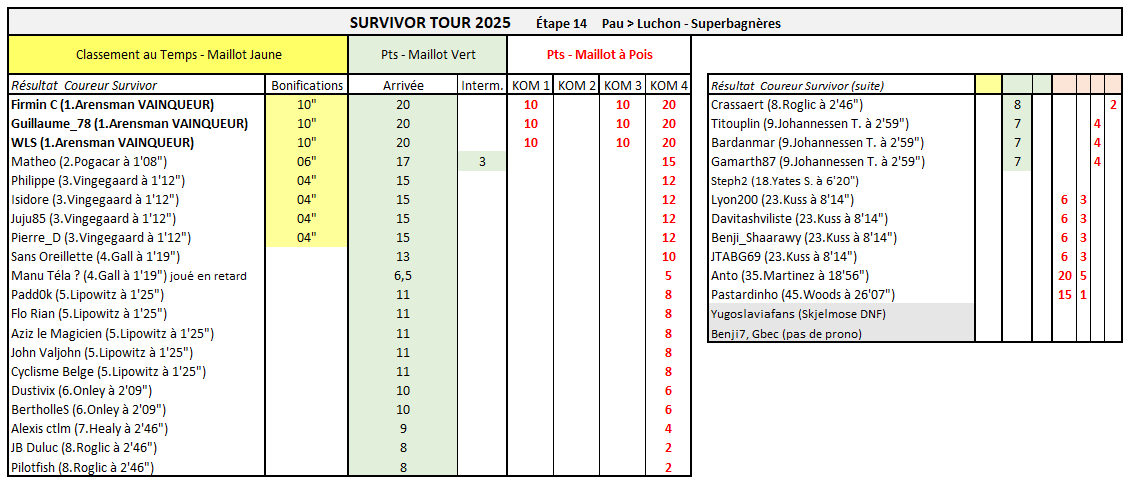
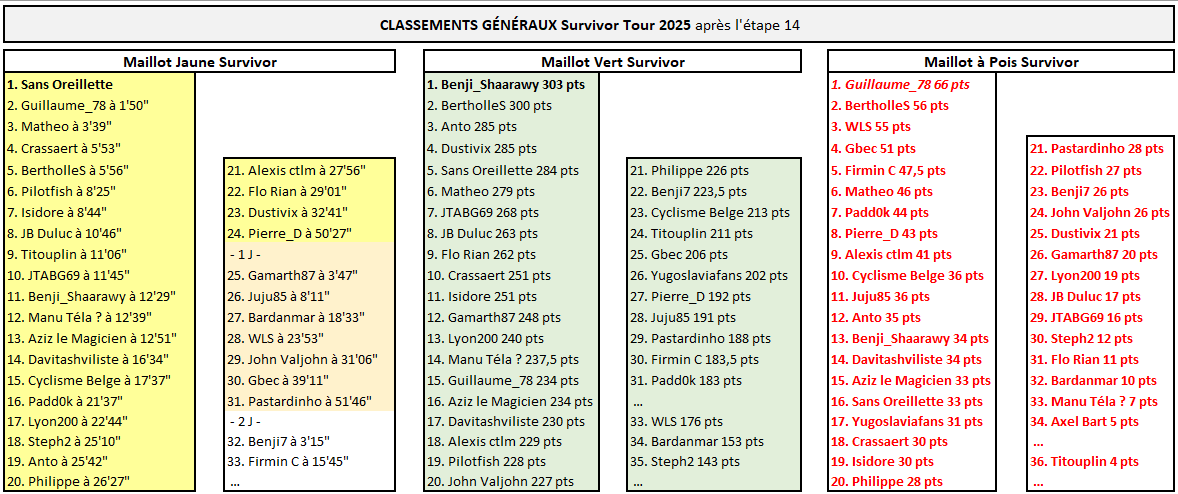
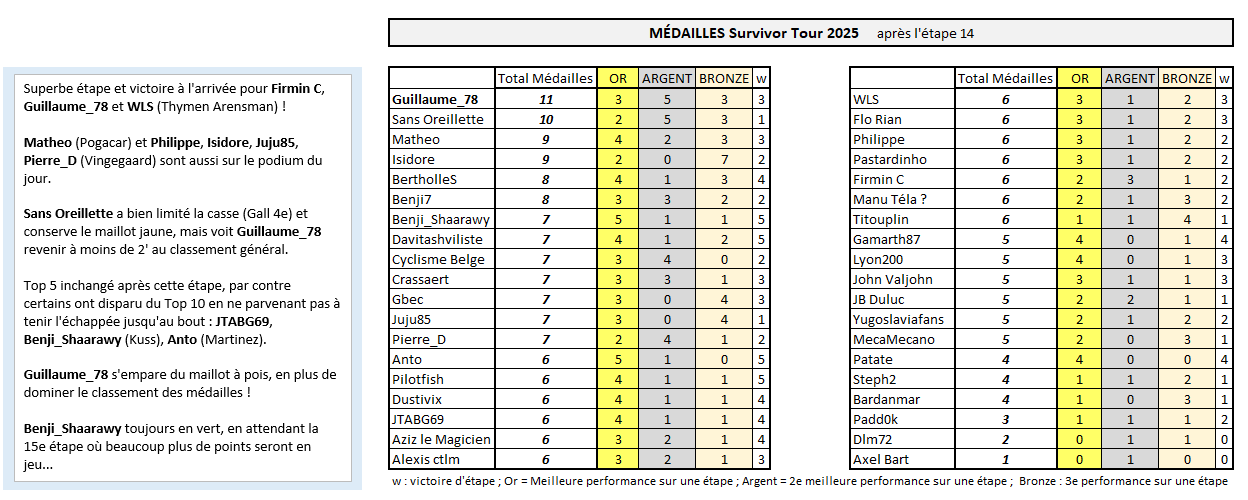
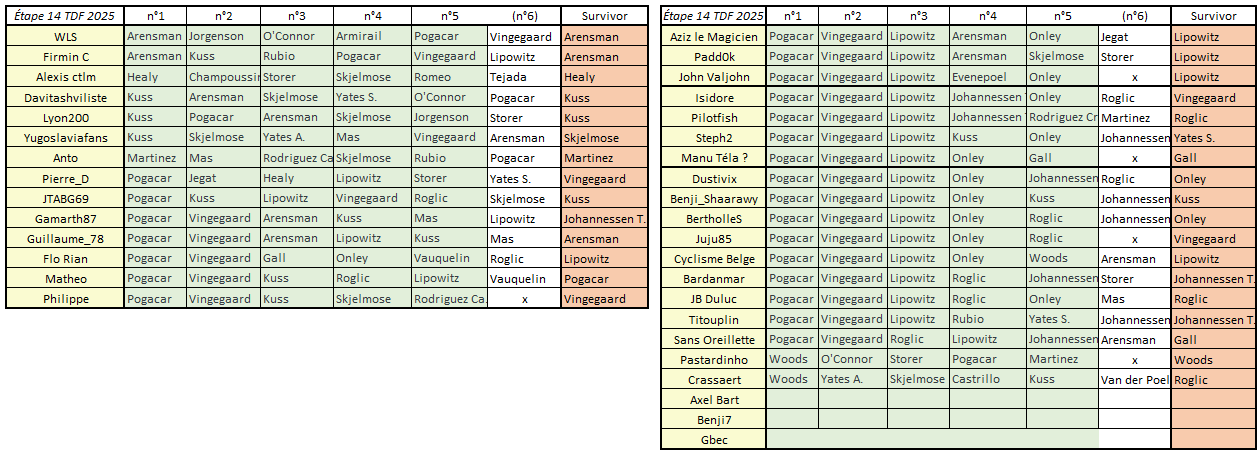
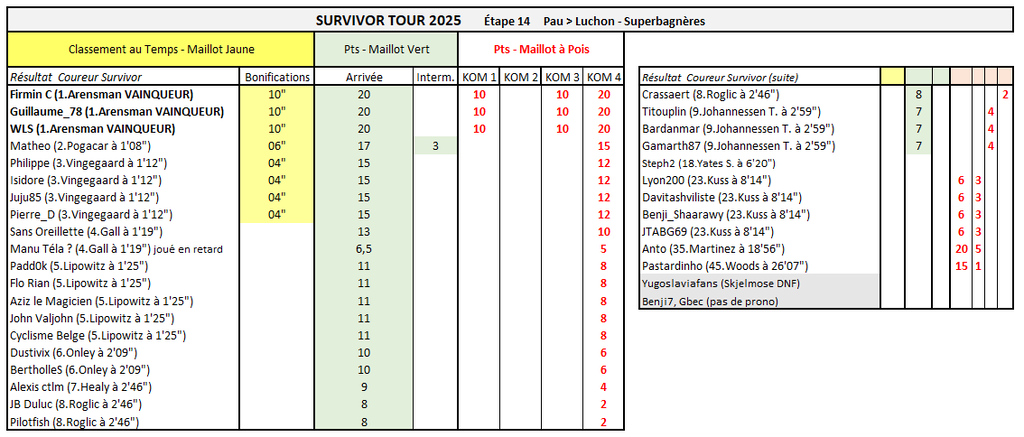
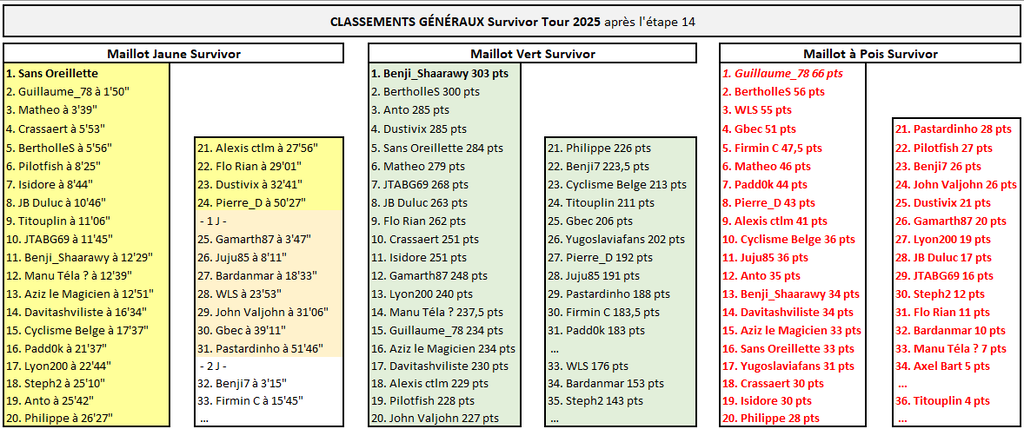
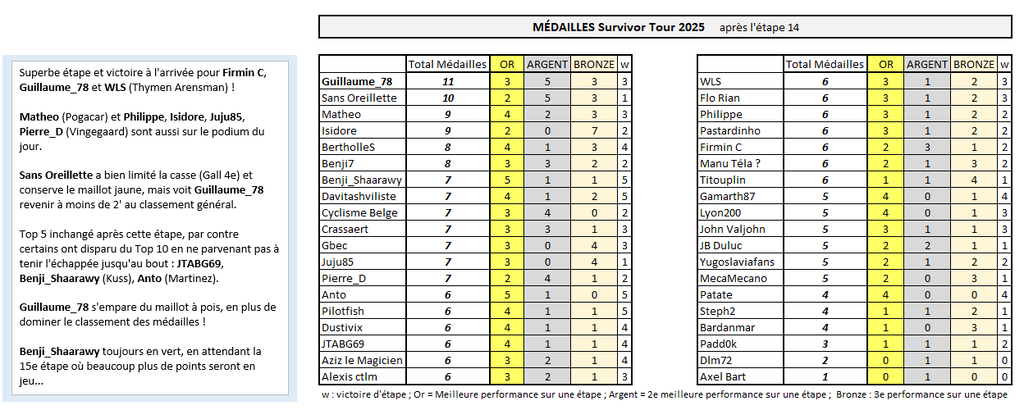
SURVIVOR TOUR Superbe étape et victoire à l'arrivée pour Firmin C, Guillaume_78 et WLS (Thymen Arensman) ! Matheo (Pogacar) et Philippe, Isidore, Juju85, Pierre_D (Vingegaard) sont aussi sur le podium du jour. Sans Oreillette a bien limité la casse (Gall 4e) et conserve le maillot jaune, mais voit Guillaume_78 revenir à moins de 2' au classement général. Top 5 inchangé après cette étape, par contre certains ont disparu du Top 10 en ne parvenant pas à tenir l'échappée jusqu'au bout : JTABG69, Benji_Shaarawy (Kuss), Anto (Martinez). Guillaume_78 s'empare du maillot à pois, en plus de dominer le classement des médailles ! Benji_Shaarawy toujours en vert, en attendant la 15e étape où beaucoup plus de points seront en jeu...
-
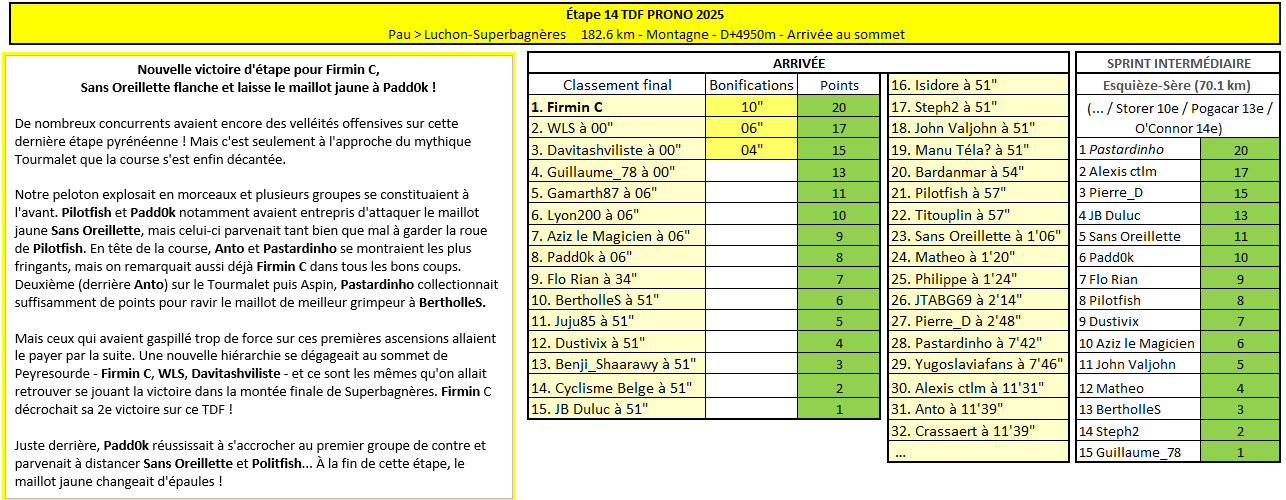
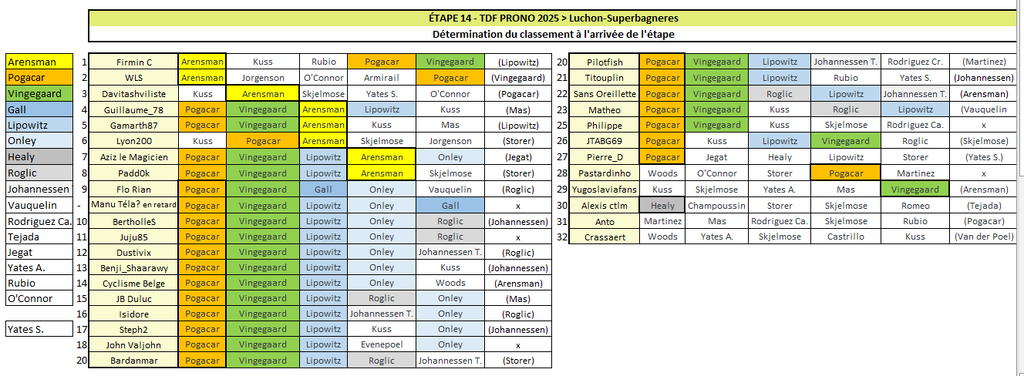
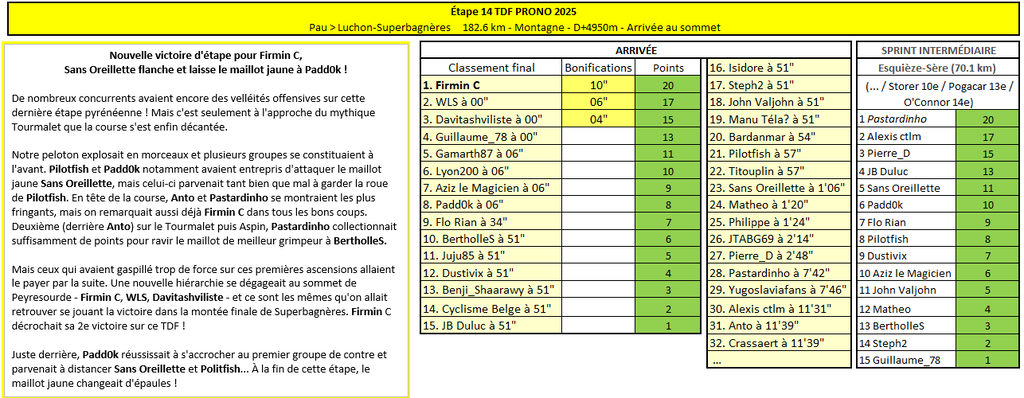
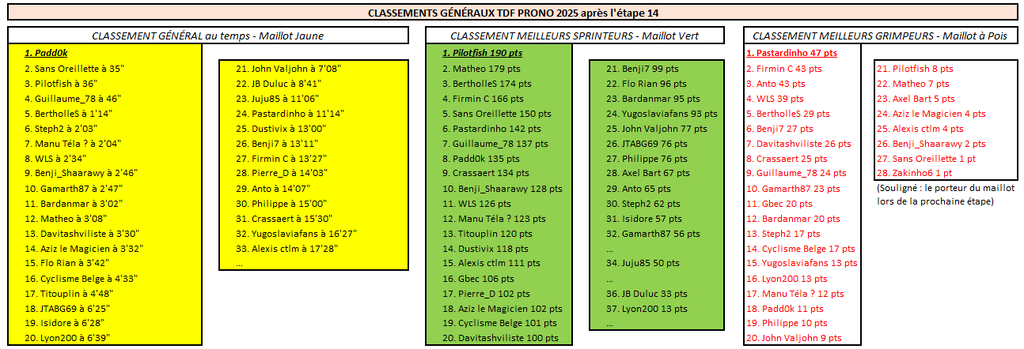
TDF PRONO Nouvelle victoire d'étape pour Firmin C, Sans Oreillette flanche et laisse le maillot jaune à Padd0k ! De nombreux concurrents avaient encore des velléités offensives sur cette dernière étape pyrénéenne ! Mais c'est seulement à l'approche du mythique Tourmalet que la course s'est enfin décantée. Notre peloton explosait en morceaux et plusieurs groupes se constituaient à l'avant. Pilotfish et Padd0k notamment avaient entrepris d'attaquer le maillot jaune Sans Oreillette, mais celui-ci parvenait tant bien que mal à garder la roue de Pilotfish. En tête de la course, Anto et Pastardinho se montraient les plus fringants, mais on remarquait aussi déjà Firmin C dans tous les bons coups. Deuxième (derrière Anto) sur le Tourmalet puis Aspin, Pastardinho collectionnait suffisamment de points pour ravir le maillot de meilleur grimpeur à BertholleS. Mais ceux qui avaient gaspillé trop de force sur ces premières ascensions allaient le payer par la suite. Une nouvelle hiérarchie se dégageait au sommet de Peyresourde - Firmin C, WLS, Davitashviliste - et ce sont les mêmes qu'on allait retrouver se jouant la victoire dans la montée finale de Superbagnères. Firmin C décrochait sa 2e victoire sur ce TDF ! Juste derrière, Padd0k réussissait à s'accrocher au premier groupe de contre et parvenait à distancer Sans Oreillette et Politfish... À la fin de cette étape, le maillot jaune changeait d'épaules !
-
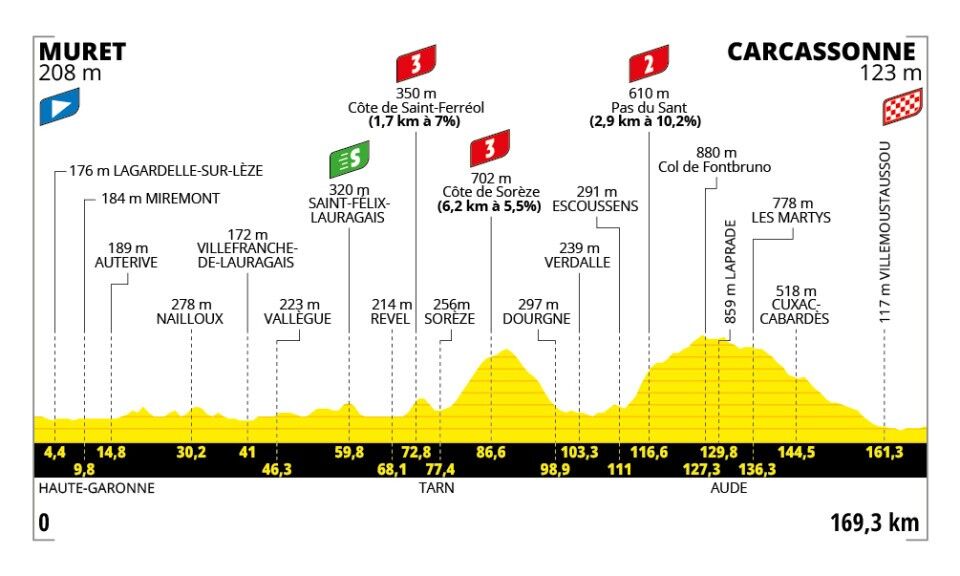
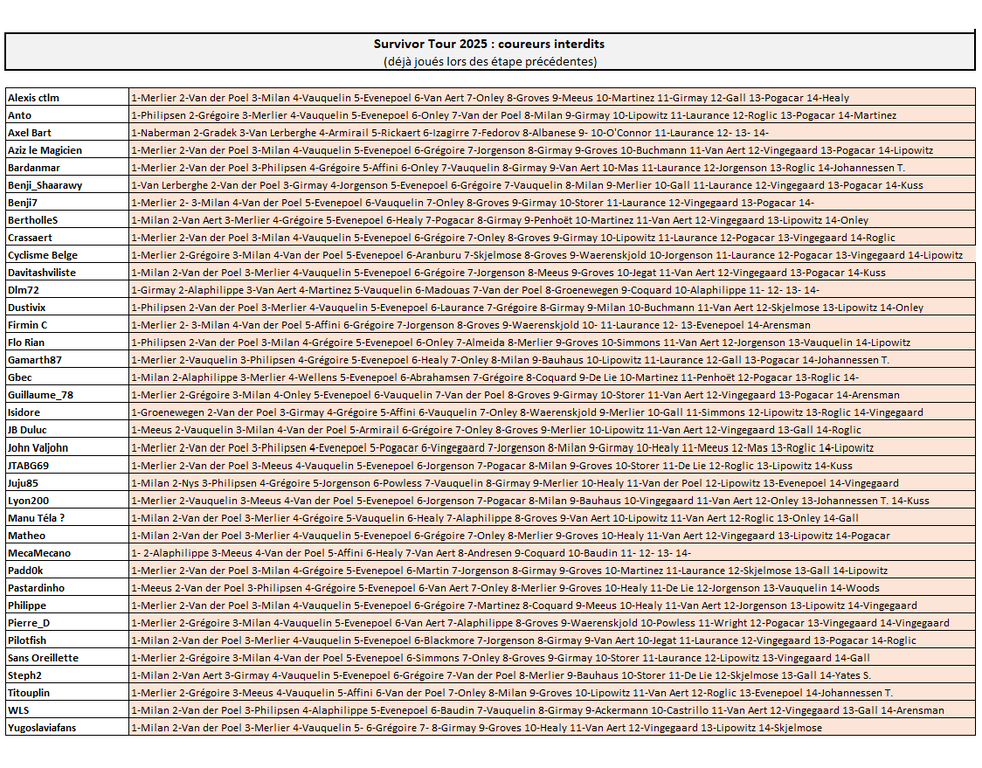
TDF Prono & Survivor Tour 2025 - Étape 15 : Muret > Carcassonne 169.3 km - Accidentée - D+2400m Départ de l'étape : dimanche 20 juillet à 13h30 --- Coureur n°1 : Coureur n°2 : Coureur n°3 : Coureur n°4 : Coureur n°5 : --- Survivor Étape 15 : ----------- Top coureurs avant cette étape : Le Top 10 du classement général : Pogačar, Vingegaard, Lipowitz, Onley, Vauquelin, Roglic, Gall, Johannessen T., Healy, Rodriguez Ca. ----------- -------------------------------------------------------------------- Vos coureurs interdits au jeu Survivor (coureurs déjà joués sur les étapes précédentes)
-
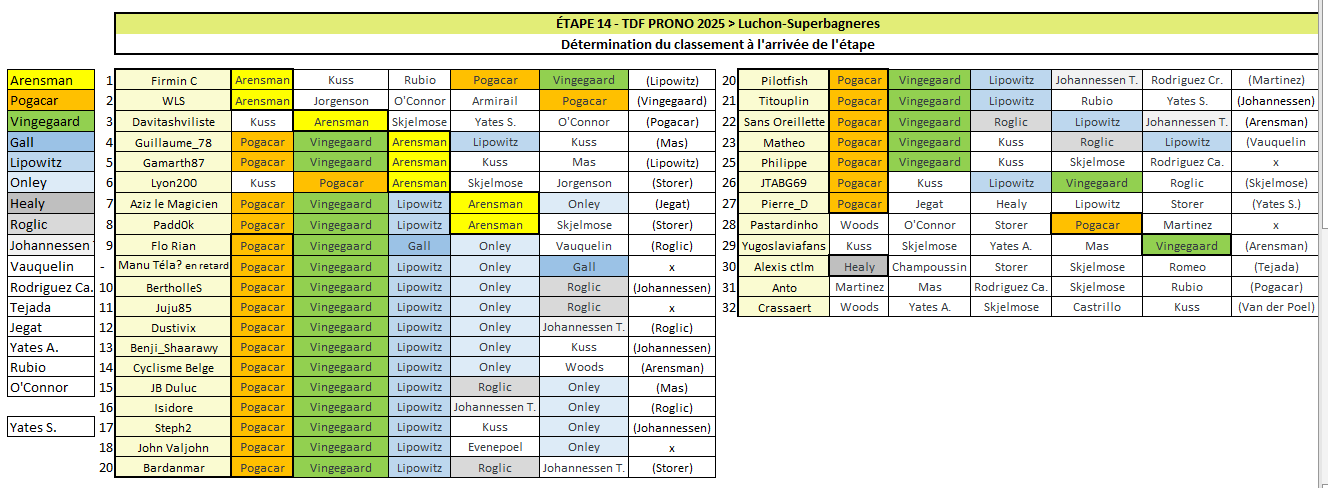
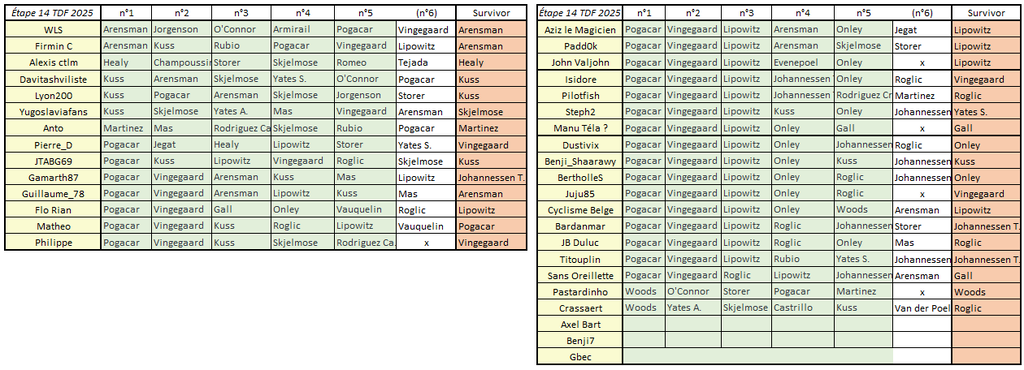
Victoire en échappé de Firmin C (Arensman n°1 + Pogacar n°4) ! C'est sa 2ème victoire d'étape depuis le début de ce TDF. WLS (Arensman n°1 + Pogacar n°5) prend la 2e place, suivi par Davitashviliste, Guillaume_78, Gamarth87, Lyon200, Aziz le Magicien et Padd0k. (Il y avait du monde sur Arensman aujourd'hui !) Le Top 10 provisoire : 1 Firmin C 2 WLS 3 Davitashviliste 4 Guillaume_78 5 Gamarth87 6 Lyon200 7 Aziz le Magicien 8 Padd0k 9 Flo Rian 10 Dustivix Sans Oreillette légèrement distancé du peloton dans le final, maillot jaune menacé !...
-
Arensman te sauve ;)
-
Récapitulatif Que le meilleur gagne !
-
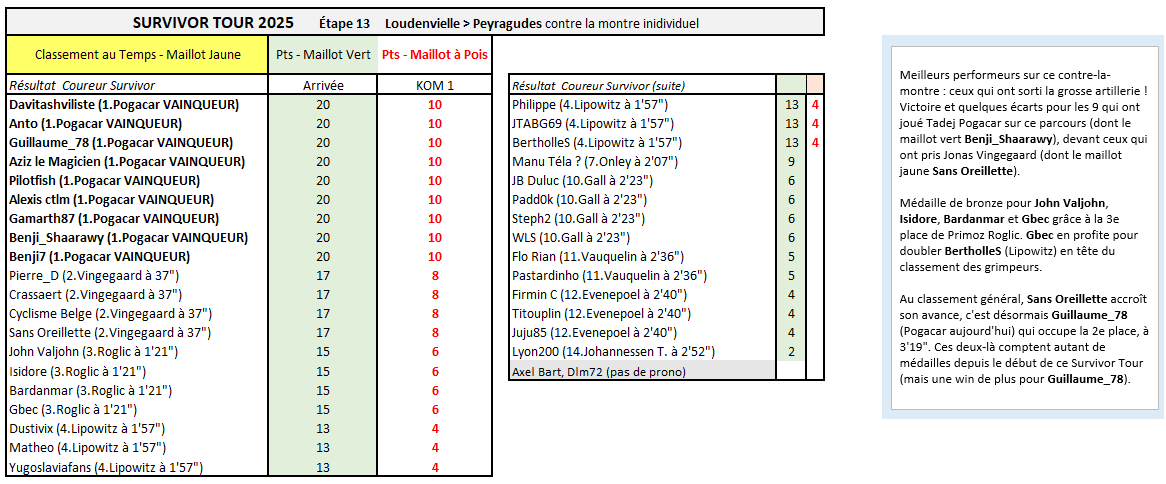
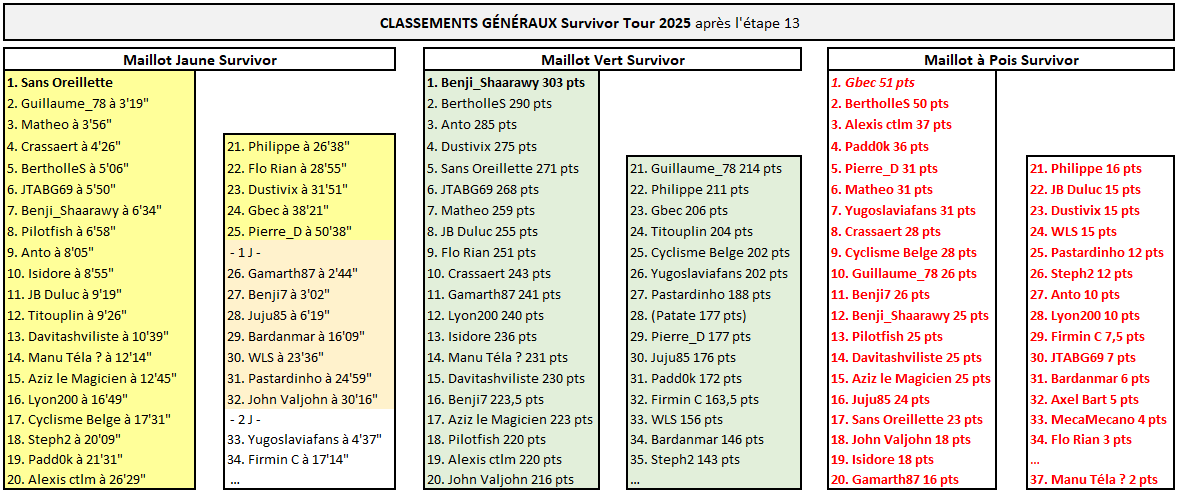
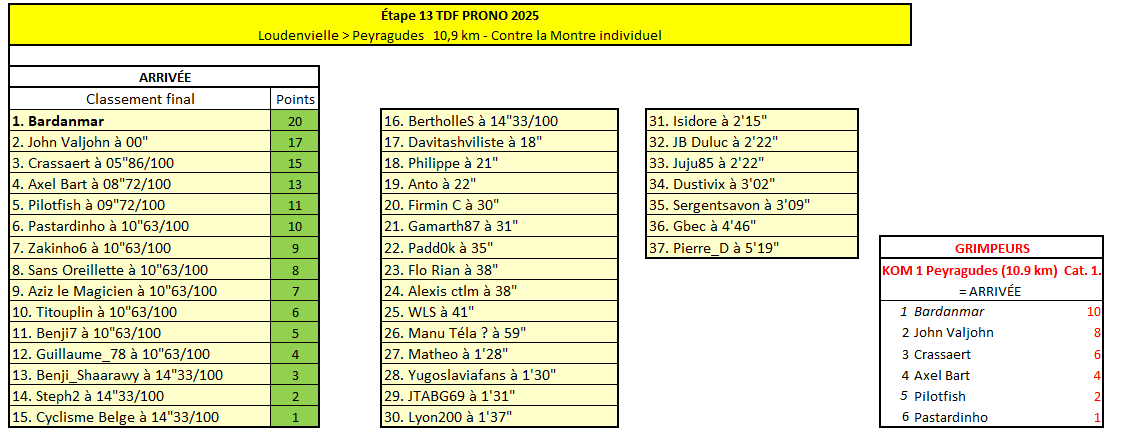
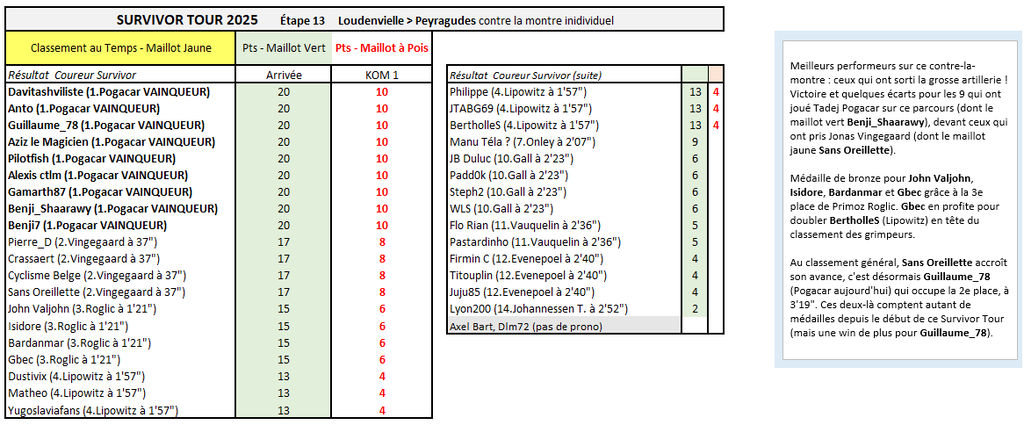
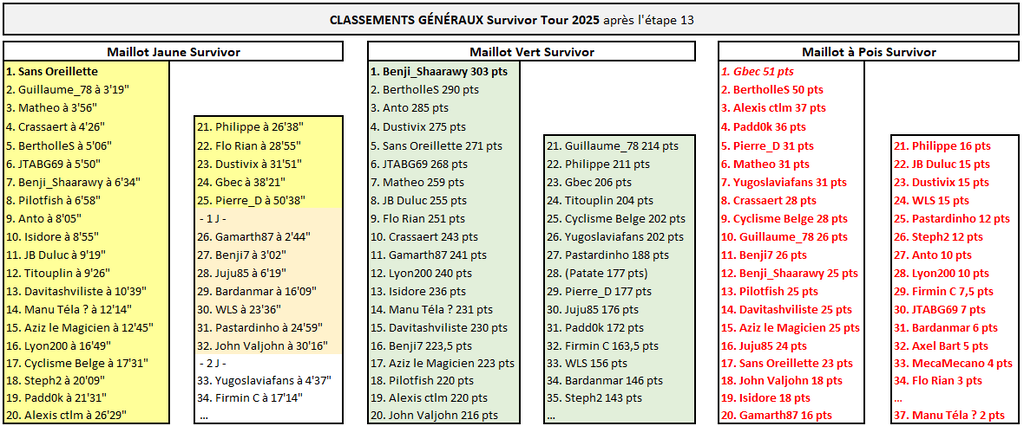
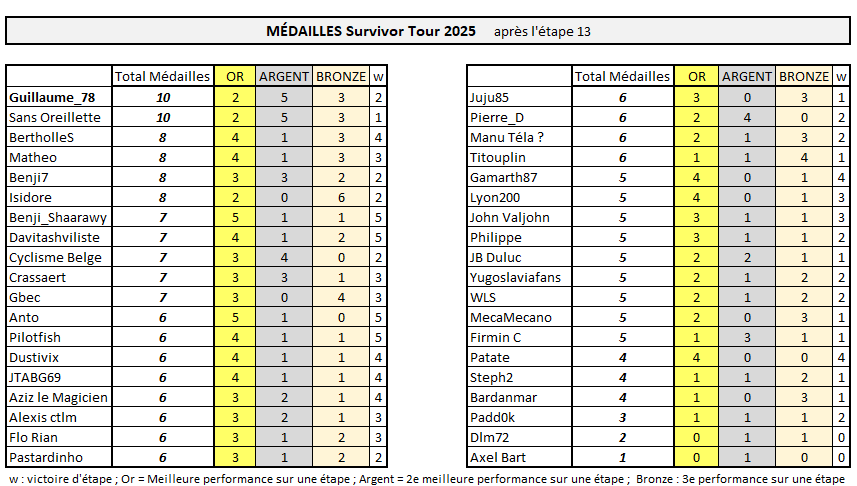
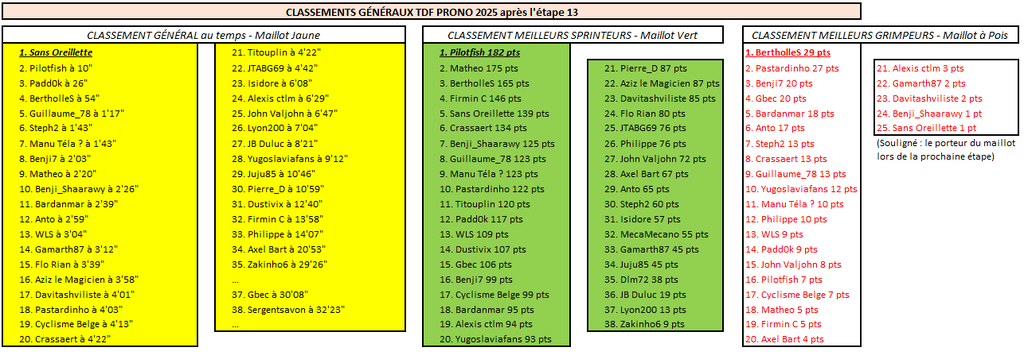
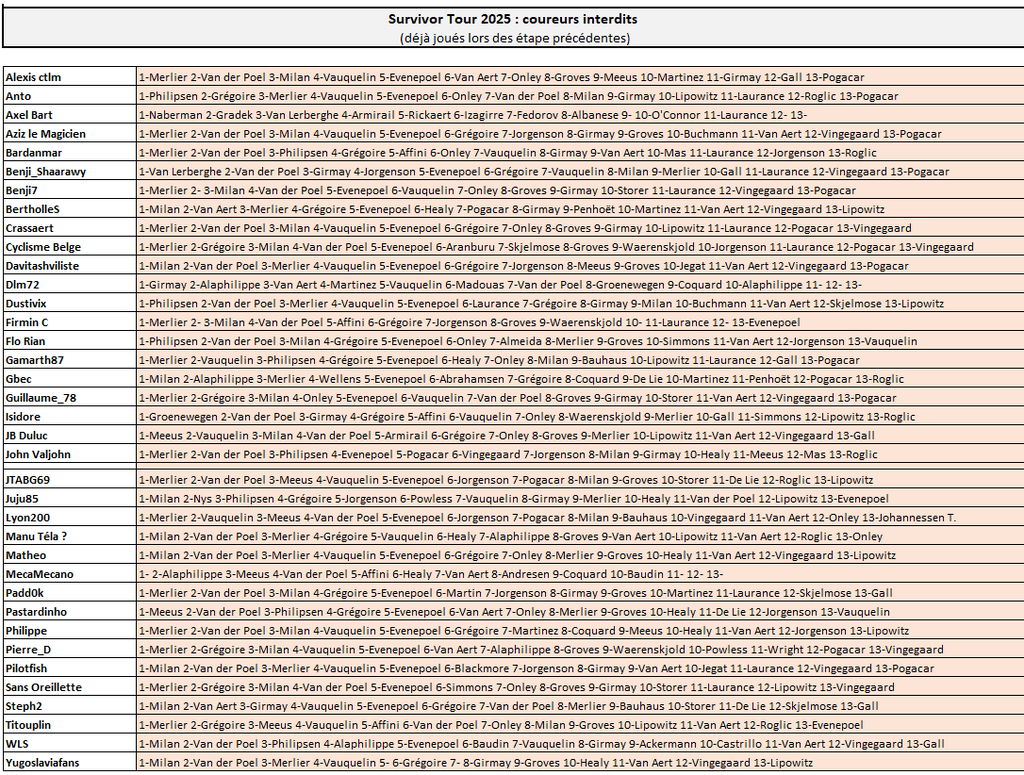
SURVIVOR TOUR Meilleurs performeurs sur ce chrono : ceux qui ont sorti la grosse artillerie ! Victoire et quelques écarts pour les 9 qui ont joué Tadej Pogacar sur ce parcours (dont le maillot vert Benji_Shaarawy), devant ceux qui ont pris Jonas Vingegaard (dont le maillot jaune Sans Oreillette). Médaille de bronze pour John Valjohn, Isidore, Bardanmar et Gbec grâce à la 3e place de Primoz Roglic. Gbec en profite pour doubler BertholleS (Lipowitz) en tête du classement des grimpeurs. Au classement général, Sans Oreillette accroît son avance, c'est désormais Guillaume_78 (Pogacar aujourd'hui) qui occupe la 2e place, à 3'19". Ces deux-là comptent autant de médailles depuis le début de ce Survivor Tour (mais une win de plus pour Guillaume_78).
-
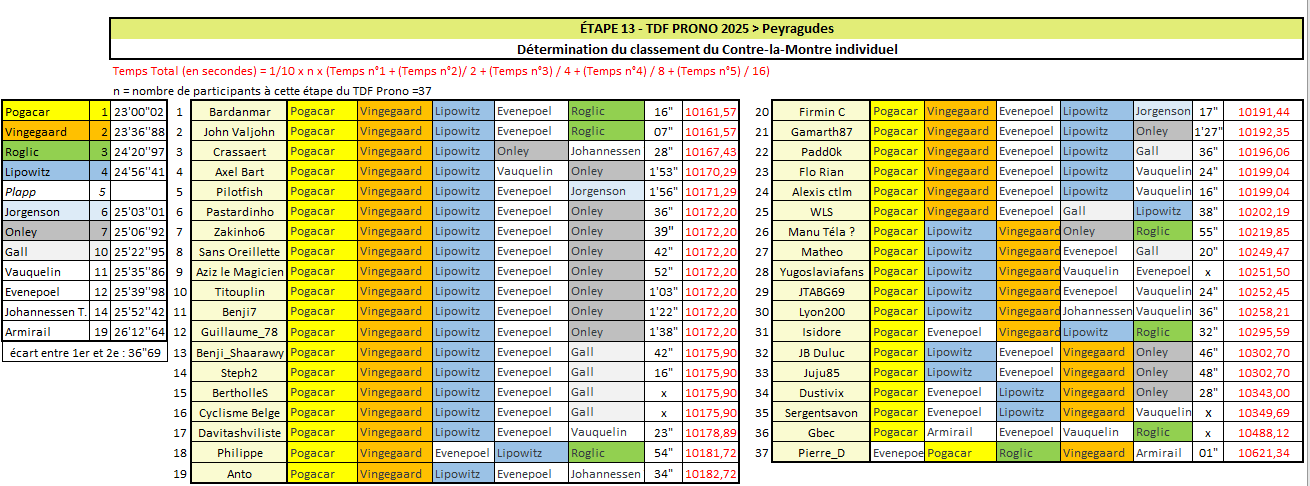
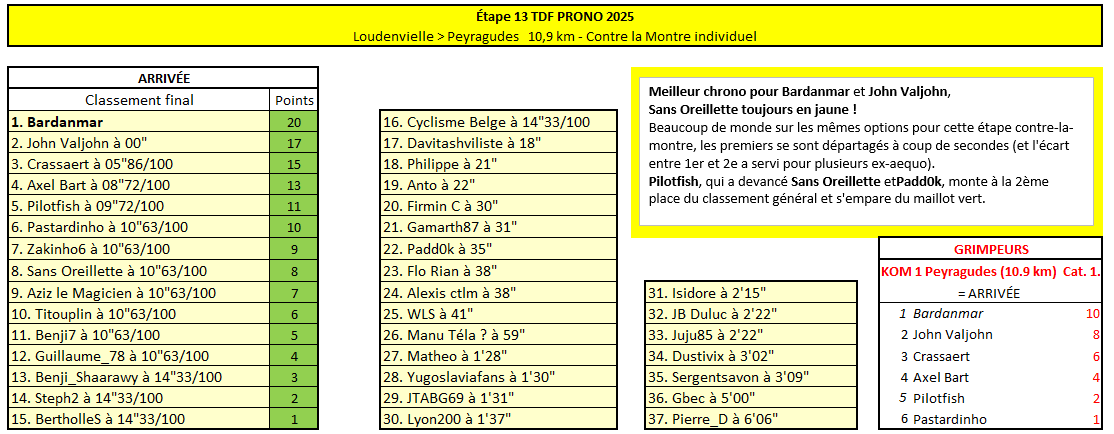
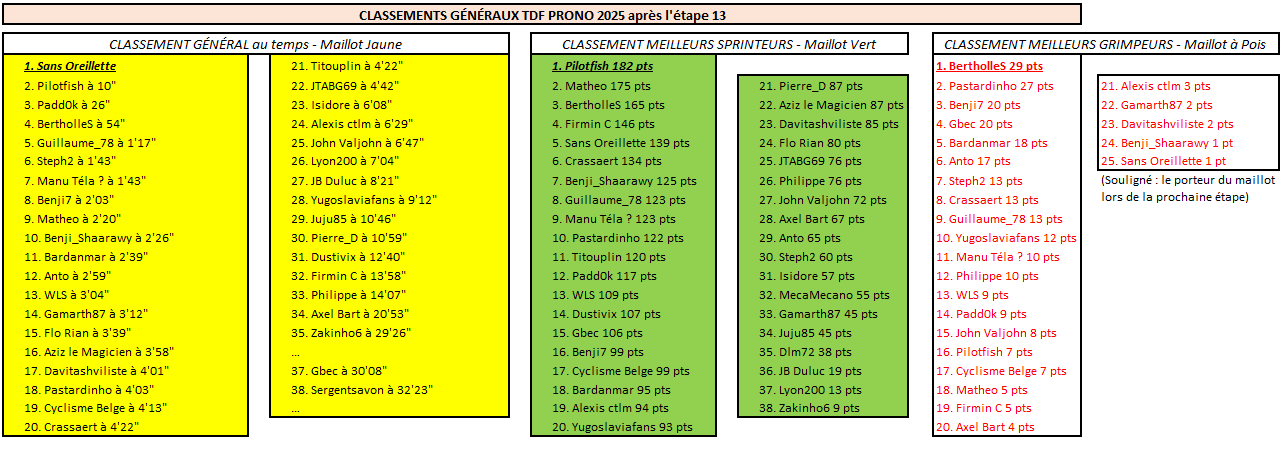
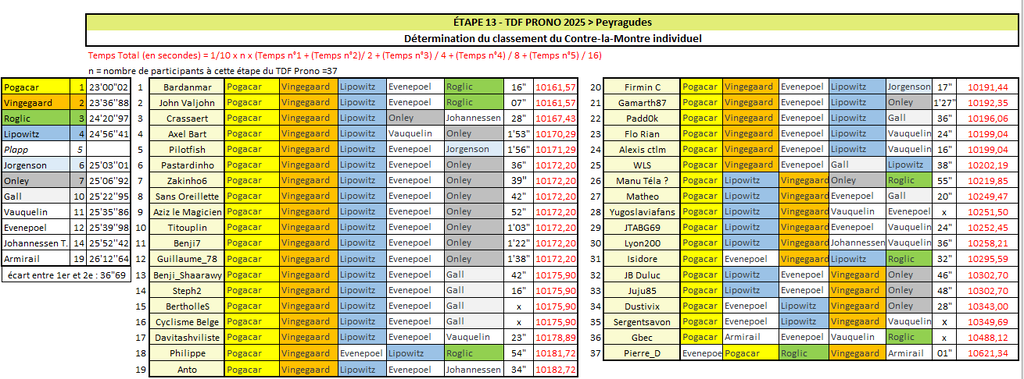
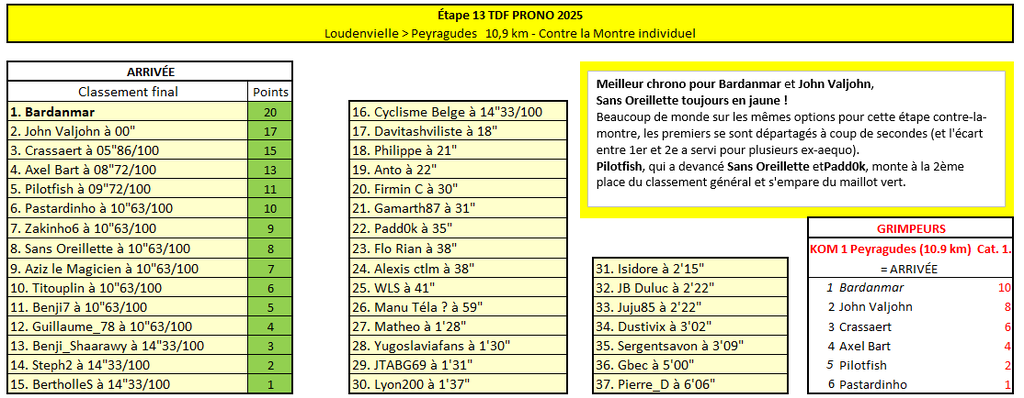
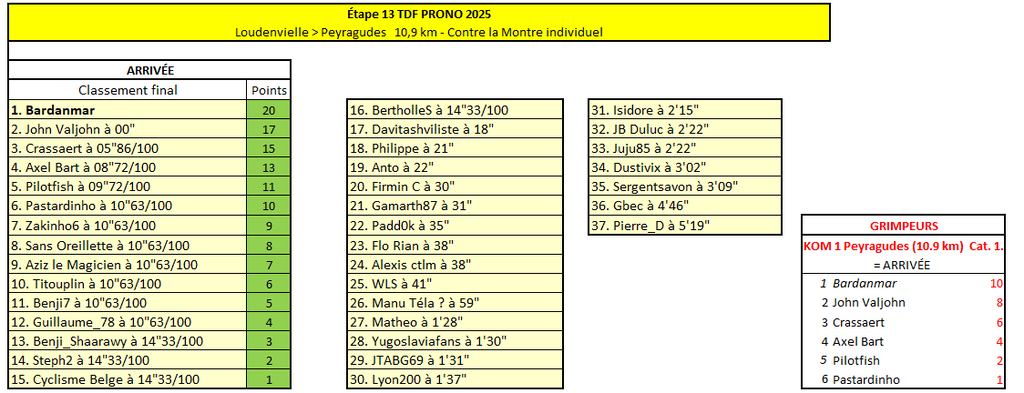
TDF PRONO Meilleur chrono pour Bardanmar et John Valjohn, Sans Oreillette toujours en jaune ! Beaucoup de monde sur les mêmes options pour cette étape contre-la-montre, les premiers se sont départagés à coup de secondes (et l'écart entre 1er et 2e a servi pour plusieurs ex-aequo). Pilotfish, qui a devancé Sans Oreillette etPadd0k, monte à la 2ème place du classement général et s'empare du maillot vert.
-
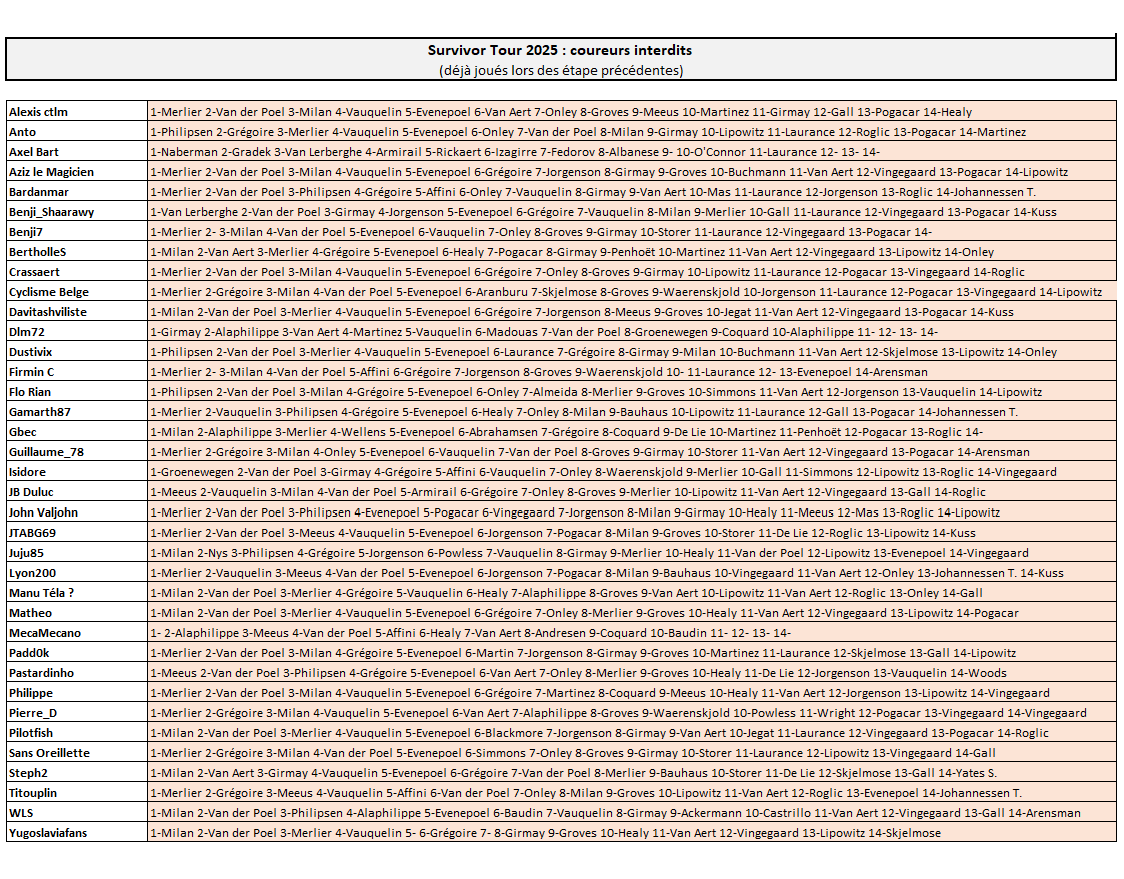
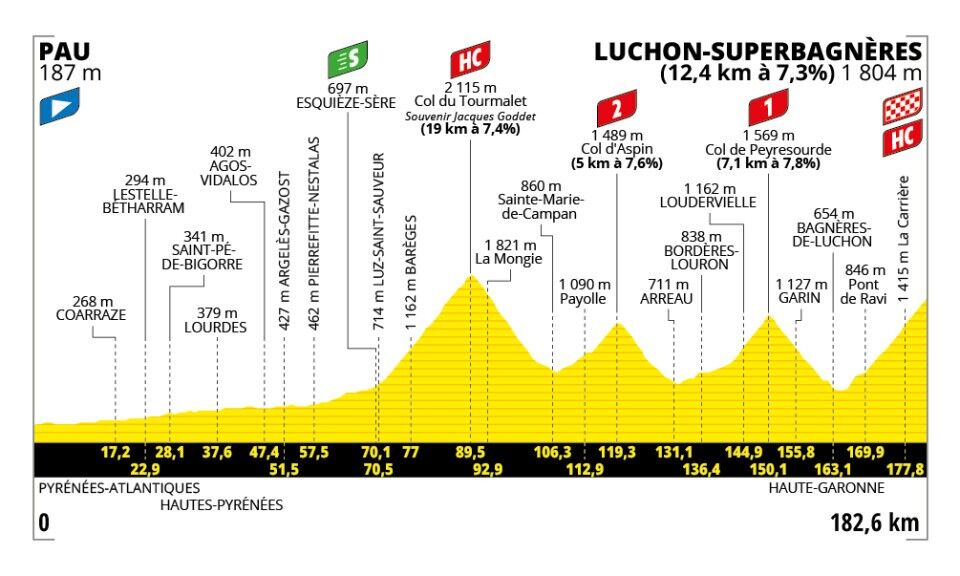
TDF Prono & Survivor Tour 2025 - Étape 14 : Pau > Luchon-Superbagnère 182.6 km - Montagne - D+4950m - Arrivée au sommet Départ de l'étape : samedi 19 juillet à 12h15 --- Coureur n°1 : Coureur n°2 : Coureur n°3 : Coureur n°4 : Coureur n°5 : (Coureur n°6) : --- Survivor Étape 14 : ----------- Arrivée au sommet Le coureur n°4 n'est pas un joker lors de cette arrivée au sommet, son temps comptera dans le calcul des écarts à l'arrivée de l'étape. ----------- Le coureur n°6 ne servira que pour départager les éventuels ex-aequo ayant joué exactement le même Top5. Son temps ne sera pas comptabilisé ----------- Top coureurs avant cette étape : Le Top 10 du classement général : Pogačar, Vingegaard, Evenepoel, Lipowitz, Onley, Vauquelin, Roglic, Johannessen T., Gall, Jorgenson ----------- -------------------------------------------------------------------- Vos coureurs interdits au jeu Survivor (coureurs déjà joués sur les étapes précédentes)
-
Résultats TDF Prono
-
Top 10 provisoire de ce contre-la-montre 1 Bardanmar 2 John Valjohn 3 Crassaert 4 Axel Bart 5 Pilotfish 6 Pastardinho 7 Zakinho6 8 Sans Oreillette 9 Aziz le Magicien 10 Titouplin Moins d'une seconde d'écart entre Pilotfish et Sans Oreillette, qui va encore conserver le maillot jaune !